Articles

Prompting: Hairstyles

Prompting: Hairstyles

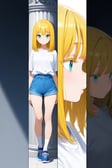
Hey all! I made a visual example of the different hairstyles you can use for your prompts. Keep in mind that you can pair the hairstyles with the length of the hair too!Shoutout to annnnnie for the hairstyle list!
2.2K
158
Dual-character Action Prompts Sharing - 二人用アクションprompts - 双人动作提示词分享

Dual-character Action Prompts Sharing - 二人用アクションprompts - 双人动作提示词分享

BeginningWhen there are two characters in the scene, do you often find it difficult to control their interactions?I’ve prepared multiple dual-character action prompts for you! That, after testing, work well with most models. ✨If you have more, comment and let everyone know!✨ At the end of the article, there are Demonstration Images showing the effects.If you want to watch Video Tutorial (which is more efficient and intuitive), you can visit 👉 https://www.instagram.com/p/DJZpqM9SzxA/I'm Annie and this is a Prompts Series by TA Official, more prompt sharing will be released gradually in the future. And welcome to follow our Official Instagram 💗👉 https://www.instagram.com/tensor.art/ .This is where you can be the first to receive our shared videos.😉PromptsKisskiss -- キス -- 亲吻kiss cheek -- 頬へのキス -- 亲脸颊kissing forehead -- おでこにキス -- 亲额头french kiss -- ディープキス -- 法式接吻(舌吻)pocky kiss -- ポッキーキス -- 百奇棒接吻Head and Face relatedheads together -- 頭を寄せ合う -- 头靠头face-to-face -- 顔を合わせる -- 面对面cheek-to-cheek -- 頬を合わせる -- 贴面forehead-to-forehead -- おでこを合わせる -- 额头相贴noses touching -- 鼻を触れ合わせる -- 鼻尖相碰cheek-to-breast -- 頬を胸に当てる -- 脸颊贴胸head on chest -- 胸に頭を乗せる -- 头靠胸膛head on another's shoulder -- 肩に頭を乗せる -- 头靠肩膀 Eye contactlooking at another --アイコンタクト -- 对视lightning glare -- 鋭い睨み -- 锐利瞪视(带有电光)confrontation -- 対峙 -- 对峙Handholding hands -- 手をつなぐ -- 牵手hand on another's head -- 頭に手を置く -- 手放对方头上hand on another's cheek -- 頬に手を当てる -- 手抚脸颊hand on another's waist -- 相手の腰をつかむ -- 扶着对方的腰slapping -- 平手打ち -- 掌掴handshake -- 握手 -- 握手high five -- ハイタッチ -- 击掌pinky swear -- 指切りげんまん -- 拉钩约定fist bump -- フィストバンプ -- 碰拳Armheart hands duo -- ハートハンド -- 双手比心(双人)arm around neck -- 首に腕を回す -- 搂脖子,搂肩arm around the waist -- 腰に腕を回す -- 搂腰one armed carry -- 片腕抱き -- 单臂托抱locked arms -- 腕を組む -- 挽手臂heart arms -- ハートアーム -- 手臂比心(单人)arm wrestling -- 腕相撲 -- 掰手腕Hug and carryhug -- ハグ -- 拥抱cuddling -- 寄り添う -- 依偎hug from behind -- 後ろから抱きつく -- 背后拥抱shoulder carry -- 肩車 -- 扛肩waist hug -- 腰抱き -- 环腰抱bridal carry -- 花嫁抱っこ -- 新娘抱(婚礼式横抱)princess carry -- お姫様抱っこ -- 公主抱piggyback -- おんぶ -- 背背Others over the knee -- 膝の上 -- 膝上姿势lap pillow -- 膝枕 -- 膝枕shared umbrella -- 相合傘 -- 共撑一伞shoulder-to-shoulder -- 肩を並べる -- 肩并肩back-to-back -- 背中合わせ -- 背靠背asymmetrical -- 非対称フィット-- 非对称合照symmetrical-- 対称フィット -- 对称合照breast contest -- おっぱいコンテスト -- 胸部比拼Demonstration Image
1.7K
113
Prompting: Lighting

Prompting: Lighting

Hello! Here's another widely requested article for prompting lighting! I hope it's helpful and as always remember than depending on the models you use, the results may vary!Settings used to generate these images:
1.6K
91
Prompting: Eyes. Colors, Shapes & More

Prompting: Eyes. Colors, Shapes & More

Hey all! Today I bring you an article about prompting for eyes. As always, keep in mind that results may vary depending on the models you use.Models and settings used to generate these images:
1.5K
135
Posture Tag Study Results (Tags from Danbooru)

Posture Tag Study Results (Tags from Danbooru)

This experiment was based on the Danbooru posture tag page.1.Basic positions1.Kneeling / 2.On one knee / 3.Lying / 4.Crossed legs / 5.Fetal position6.On back / 7.On side / 8.On stomach / 9.Sitting / 10.Butterfly sitting11.Crossed legs / 12.Figure four sitting / 13.Indian style / 14.Lotus position / 15.Hugging own legs16.Reclining / 17.Seiza / 18.Sitting on person / 19.Sitting on head / 20.Sitting on lap21.Shoulder_carry / 22.Human chair / 23.Straddling / 24.Thigh straddling / 25.Upright straddle26.Wariza / 27.Yokozuwari / 28.Standing / 29.Balancing / 30.Crossed legs31.Legs apart / 32.Standing on one leg2.Movement of the body1.Balancing / 2.Crawling / 3.Idle animation / 4.Midair / 5.Falling6.Floating / 7.Flying / 8.Jumping / 9.Hopping / 10.Pouncing11.Running / 12.Walking / 13.Walk cycle / 14.Wallwalking3.Other postures potentially involving the whole body1.All fours / 2.Top-down bottom-up / 3.Prostration / 4.Bear position / 5.Bowlegged pose6.Chest stand / 7.Chest stand handstand / 8.Triplefold / 9.Ruppelbend / 10.Quadfold / 11.Cowering / 12.Crucifixion / 13.Faceplant / 14.Full scorpion / 15.Fighting stance / 16.Battoujutsu stance * / 17.Spread eagle position / 18.Squatting*prompt of 16.Battoujutsu stancekatana, (battoujutsu_stance:1.4), (casual clothes:1.4), hand on hilt, ready to draw, pastel blue kimono, wide sleeves, japanese clothes , outdoors, east asian architecture, full_body,19.Stretching / 20.Superhero landing / 21.Upside-down / 22.Handstand / 23.Headstand24.Yoga / 25.Scorpion poseno image4.Other rest points of the body1.Arm support / 2.Head rest5.Posture of the head1.Head down / 2.Head tilt / 3.Head back6.Torso inclination1.Arched back / 2.Bent back / 3.Bent over / 4.Leaning back / 5.Leaning forward6.Slouching / 7.Sway back / 8.Twisted torso7.Arms1.Arms behind back / 2.Arm up / 3.Arm behind head / 4.Victory pose / 5.Arms up6.\o/ / 7.Arms behind head / 8.Outstretched arms / 9.Spread arms / 10.Arms at sides11.Airplane arms / 12.Crossed arms / 13.Flexing / 14.Praise the sun / 15.Reaching16.Shrugging / 17.T-pose / 18.A-pose / 19.V arms / 20.W arms21.Stroking own chin / 22.Outstretched hand / 23.V / 24.Interlocked fingers / 25.Own hands clasped26.Own hands together / 27.Star hands8.Hips1.Contrapposto / 2.Sway back9.Legs1.Crossed ankles / 2.Folded / 3.Leg up / 4.Legs up / 5.Knees to chest6.Legs over head / 7.Leg lift / 8.Outstretched leg / 9.Split / 10.Pigeon pose / 11.Standing split12.Spread legs / 13.Watson cross / 14.Captain morgan pose / 15.Knees apart feet together / 16.Knees together feet apart / 17.Knee up18.Knees up / 19.Dorsiflexion / 20.Pigeon-toed / 21.Plantar flexion / 22.Tiptoes23.Tiptoe kiss10.Posture of at least two characters1.Ass-to-ass / 2.Back-to-back / 3.Belly-to-belly / 4.Cheek-to-breast / 5.Cheek-to-cheek6.Eye contact / 7.Face-to-face / 8.Forehead-to-forehead / 9.Head on chest / 10.Heads together11.Holding hands / 12.Leg lock / 13.Locked arms / 14.Over the knee / 15.Nipple-to-nipple / 16.Noses touching17.Shoulder-to-shoulder / 18.Tail lock11.Posture of at least three characters1.Circle formation / 2.Group hug12.Hugging1.Hug / 2.Hugging own legs / 3.Hugging object / 4.Hugging tail / 5.Wing hug6.Arm hug / 7.Hug from behind / 8.Waist hug13.Carrying someone1.Baby carry / 2.Carried breast rest / 3.Carrying over shoulder / 4.Carrying under arm / 5.Child carry6.Fireman's carry / 7.Piggyback / 8.Princess carry / 9.Shoulder carry / 10.Sitting on shoulder / 11.Standing on shoulder14.Poses1.Rabbit pose / 2.Horns pose / 3.Paw pose / 4.Claw pose / 5.Archer pose / 6.Bras d'honneur / 7.Body bridge8.Contrapposto / 9.Dojikko pose / 10.Ghost pose / 11.Inugami-ke no Ichizoku pose / 12.Letter pose / 13.Ojou-sama pose / 14.Saboten pose / 15.Symmetrical hand pose16.Victory pose / 17.Villain pose / 18.Zombie pose / 19.Gendou pose / 20.JoJo pose / 21.Dio Brando's pose / 22.Giorno Giovanna's pose / 23.Jonathan Joestar's pose / 24.Kujo Jotaro's pose / 25.Kongou pose / 26.Kujou Karen pose15.Hair1.brushing own hair / 2.hand in own hair / 3.playing with own hair / 4.twirling hair / 5.tucking hair6.floating hair / 7.hair floating upwards / 8.hair spread out / 9.messy hairThank you for taking a look!
1.4K
79
Prompting: Skin Colors, Conditions, Types, Marks and Scars

Prompting: Skin Colors, Conditions, Types, Marks and Scars

Hello all! This article was requested by many of you, it's a bit long, but it covers a lot of prompting words regarding to skins. Remember depending on your models, results may vary!Skin TypesSkin ConditionsVitiligo LoRASkin ColorsSkins (Fantasy & Unnatural Tones)ScalesFur & FeathersMarks & Scars
1.4K
92
Gesture Prompts Sharing🫶 - AIの手のプロンプト集 - 手部提示词分享

Gesture Prompts Sharing🫶 - AIの手のプロンプト集 - 手部提示词分享

BeginningHand Gesture have always been a very challenging aspect to control. I wish to share some highly effective prompts for controlling Gestures.The tested Model is ✨🎨Illustrious - AnimeMaster✨ and these prompts perform well on most models.At the end of the article, there are Demonstration Images showing the effects.If you want to watch Video Tutorial (which is more efficient and intuitive), you can visit 👉 https://www.instagram.com/p/DIeFERbygkO/?hl=zh-cnI'm Annie and this is a Prompts Series by TA Official, more prompt sharing will be released gradually in the future. Stay tuned! And welcome to follow our Official Instagram 💗👉 https://www.instagram.com/tensor.art/ .This is where you can be the first to receive our shared videos.😉PromptsFingersindex_finger_raised 、人差し指を上げる|举起食指shushing 、しーっ|嘘🤫pinky_out 、小指を外側に出す|翘小拇指thumbs_down 、親指を下に向ける|差评👎thumbs_up 、親指を立てる|点赞👍double_thumbs_up 、二本親指を立てる|双手拇指点赞finger_gun 、指銃|手枪double_finger_gun 、二本指銃|双手手枪two_finger_salute 、二本指で敬礼する|二指敬礼finger_frame 、指フレーム|手指比取景框spread_fingers 、指を広げる|分开手指x_arms 、腕を組む|手臂比叉x_fingers 、二本指|手指比叉fidgeting 、そわそわするV|食指相对steepled_fingers 、尖った指|手指金字塔Victory Signv 、ピース|比耶✌️double_v 、二本V|双手比耶v_over_eye 、vを目にかざす|眼睛前比耶v_over_mouth 、vを口にかざす|嘴巴上比耶gyaru_v 、ギャルのv|反手比耶 辣妹式Fistpower_fist 、パワーフィスト|挥拳fist_bump 、拳を突き合わせる|碰拳fist_in_hand 、手に握りしめた拳|紧握拳头clenched_hands 、握りしめた手|紧握双手Pointingpointing 、指さし|指pointing_at_self 、自分を指さすf|指自己pointing_at_viewer 、視聴者を指差す|指向关注pointing_down 、下を向いている|向下指pointing_forward 、前を向いている|向前指pointing_up 、上を向いている|向上指Coveringcovering over face 、顔を覆う|遮住脸covering over eyes 、目を覆う|遮住眼睛covering over mouth 、口を覆う|遮住嘴covering over ears 、耳を覆う|遮住耳朵Otherscupping_hands 、両手をすくめる|杯状手own_hands_clasped 、自分の手|握住自己的手money_gesture 、お金のジェスチャー|金钱手势ok_sign 、OKサイン (very similar to money_gesture)|比OKtwirling_hair 、髪をくるくる回す|玩头发shadow_puppet 、影絵|影子手偶fox_shadow_puppet 、キツネの影絵|狐狸影子手偶pinching_gesture 、つまむジェスチャー|捏合手势reaching 、手を伸ばす|伸手waving 、手を振る|挥手beckoning 、手招きする|招手
1.2K
55
绘图提示词整理:第一章|常用身体部位与表情关键词 Chapter 1: Common Body Parts and Facial Expressions

绘图提示词整理:第一章|常用身体部位与表情关键词 Chapter 1: Common Body Parts and Facial Expressions

在开始绘图前,请先明确你的构图场景、风格方向,以及希望传达的细节关键词。本期是一章辅助提示词分享,排版由AI帮我完成,我比较懒的排版常用提示词参考(双重曝光风格)以下是我经常使用的 Prompt 示例,适用于“双重曝光”风格。不同模型表现略有差异,仅供参考,如有问题欢迎指正:silhouette, within, blending, blended, merged, filled with / into, Jeddbleil, double exposure手部动作(Hand Gestures)互动与招呼类waving:挥手(角色打招呼、道别)【社交、迎接、离别】saluting:行军礼(正式致意)【军事、正式场合】high-five:击掌(庆祝、友好)【伙伴间庆祝、友谊】clapping:鼓掌(赞美、认可)【庆祝、演出】pointing:指向(强调方向或目标)【讲解、示意、互动】表达与情感类thumbs-up:竖起大拇指(赞同、鼓励)【积极反馈、喜好】thumbs-down:竖起大拇指向下(否定、不满意)【否定、表达失望】fist-clenching:握拳(愤怒、紧张、决心)【战斗前、内心斗争】open-palm:张开手掌(欢迎、防御、祈祷)【招呼、接纳、请求】finger-snapping:打响指(节奏感、魔法瞬间)【表演、变化】思考与姿态类hand-on-chin:手托下巴(沉思、困惑)【思考、犹豫】hand-on-hip:手叉腰(自信、不满)【质问、姿态感】hand-on-face:手捂脸(震惊、羞涩、失落)【反应瞬间、内向情绪】hand-on-heart:手放胸口(真诚、感动、发誓)【感情表达、承诺】表现与动态类grabbing:握住(紧张、抓住机会)【紧张时、紧急动作】fingertips-touching:手指尖接触(细心、低调、计划)【思考、低调交流】pinching:捏住(小心、关心、纠结)【检查、轻轻触碰】flipping:翻动(无聊、愤怒)【翻书、翻桌】palms-together:双掌合十(祈愿、感激、求助)【请求、祈祷】picking-up:捡起(专注、小心)【细致操作、动作】难度 / 节奏类spreading-fingers:张开手指(强烈、压力)【紧张、惊讶】gripping:紧握(控制、专注)【抓住、攻击】tapping-fingers:轻敲手指(焦虑、不耐)【等待、急切】其他细节表现类shaking-hand:握手(交流、协议)【社交、合作】twisting-wrist:转动手腕(疲劳、无聊)【细节动作】flexing-fingers:弯曲手指(放松、恢复、体操)【手部活动】resting-hand:手轻放(放松、休息)【情感松弛】clapping-back:背后鼓掌(偷偷支持)【暗中支持】腿部动作(Leg Gestures)姿势类standing-with-legs-apart:双腿分开站立(稳重、自信)【战斗准备、威严展示】standing-with-legs-crossed:双腿交叉站立(休闲、放松)【等待、聊天场景】sitting-cross-legged:盘腿坐(随意、放松、冥想)【居家、教室、自然场景】sitting-with-legs-stretched:双腿伸直坐(疲惫、放松)【旅行、休息】sitting-with-legs-bent:双腿弯曲坐(含蓄、少女感)【害羞、情绪细腻场景】walking-with-long-strides:大步走(自信、紧迫)【赶路、任务场景】walking-with-short-steps:小步走(谨慎、优雅)【紧张、礼仪场景】kneeling:跪姿(恳求、忠诚、礼拜)【宗教、情感高潮】squatting:蹲下(观察、调皮、准备动作)【低视角互动、行动开始】脚部动作类tip-toeing:脚尖站立(轻盈、偷偷、谨慎)【悄悄行动、偷袭】pointing-toe:指向脚尖(展现优雅、舞蹈动作)【舞蹈、优雅动作】flexing-ankles:弯曲脚踝(疲劳、恢复、舒展)【休息、放松】bouncing-on-toes:踮脚跳跃(活力、期待)【紧张、急切等】foot-tapping:脚尖敲击地面(焦虑、不耐)【等待、急切】crossing-ankles:交叉脚踝(优雅、放松)【放松、优雅的坐姿】rocking-back-and-forth:前后摇摆(焦虑、不安)【焦虑、等待】raising-heel:提起脚跟(不安、注意力集中)【紧张、预备动作】kicking:踢(愤怒、冲动)【防御、发泄愤怒】stepping-forward:向前迈步(进取、自信)【进攻、走向目标】stepping-backward:向后退步(后退、避免)【防守、撤退】twisting-feet:脚部旋转(困惑、不安)【不耐烦、焦虑】脚趾动作类wiggling-toes:脚趾扭动(放松、舒适)【休息、放松】curling-toes:脚趾蜷曲(紧张、不安)【紧张状态】pointing-toe:脚趾指向(优雅、舞蹈)【舞蹈、表现】scrunching-toes:脚趾收缩(不适、困扰)【疲惫、不适】tapping-toes:脚趾轻敲(不耐烦、急切)【等待、焦虑】spreading-toes:脚趾张开(放松、舒展)【恢复、轻松】pressing-toes:脚趾用力(紧张、力量)【控制、发力】手指动作(Finger Gestures)指令与强调类pointing-with-index-finger:用食指指向(下指令、强调)【命令、讲课、展示物品】making-a-fist:握拳(愤怒、斗志)【决斗、激动、煽动情绪】making-a-peace-sign:竖两指(胜利、和平、自拍)【合影、流行文化】making-a-come-here-gesture:招手让人过来(暗示、引导)【角色互动、引导】making-a-stop-gesture:手掌前伸(制止、警告)【争执、警觉】making-a-call-me-gesture:拇指和小指张开(联系、社交)【俏皮、暗示沟通】making-a-thumbs-up-gesture:举拇指(称赞、肯定)【胜利、认可】making-a-thumbs-down-gesture:拇指向下(反对、否定)【拒绝、嘲讽】手指与手掌互动类(Finger and Palm Interaction)pointing-with-multiple-fingers:多指指向(指示、强调方向)【指引、指向】touching-fingers:手指互相触碰(思考、犹豫、细致)【思考、谨慎】holding-a-finger-to-lips:食指放在嘴唇上(示意安静、谨慎)【安静、隐秘】index-finger-and-thumb-pinch:食指和拇指捏住(轻触、审视)【检查、敏感操作】手腕动作类(Wrist Gestures)wrist-twist:转动手腕(放松、无聊)【疲劳、细节动作】flexing-wrist:弯曲手腕(用力、强迫)【力量、控制】shaking-wrist:摇晃手腕(不耐烦、失望)【焦虑、反应】flicking-wrist:振动手腕(生气、激动)【快速反应、警告】手臂动作类(Arm Gestures)raising-arm:举臂(求救、问询)【寻求帮助、庆祝】lowering-arm:放下手臂(放松、平静)【失望、退却】crossing-arms:双臂交叉(防御、不信任)【拒绝、冷漠】stretching-arm:伸展手臂(放松、舒展)【恢复、疲劳后的动作】elbow-pointing:弯曲肘部指向(暗示、挑衅)【无声交流、态度表现】pushing-with-arm:用手臂推(推动、抵抗)【防守、推动】pulling-with-arm:用手臂拉(拉住、吸引)【控制、反向动作】其他手部细节动作(Other Hand Details)finger-waving:手指晃动(不满、警告)【反对、威胁】clenching-fingers:紧握手指(专注、愤怒)【紧张、决心】stretching-fingers:伸展手指(放松、恢复)【恢复、放松】thumb-over-finger:大拇指压住食指(决策、犹豫)【考虑、思考】头部动作(Head Gestures)同意与否定类nodding:点头(同意、认可)【正常对话、肯定答复】shaking-head:摇头(否定、不信)【拒绝、怀疑】思考与疑惑类tilting-head:侧头(疑惑、卖萌)【思考、好奇、撒娇】looking-up:向上看(幻想、灵感、请求)【祈祷、星空、想象力】looking-down:低头(思考、内敛、羞涩)【伤感、失落、沉思】情感与表达类bowing-head:低头(羞愧、礼貌、悲伤)【认错、反省、正式场合】raising-eyebrows:挑眉(惊讶、调情)【表情丰富、反应场景】furrowing-brows:皱眉(担心、生气)【冲突、压力场景】winking:眨眼(打趣、默契)【俏皮、暗号】blinking:眨眼(自然动作、困倦)【情绪缓冲、转场】面部与头部动作组合(Head + Facial Combos)head-tilt-with-smile:侧头微笑(撒娇、魅力、亲和力)【亲近、温柔】head-tilt-with-frown:侧头皱眉(疑惑、不解)【好奇、质疑】face-palming:捂脸(震惊、羞愧、失望)【意外、尴尬】looking-away:偏头看向远方(思考、逃避)【沉思、逃避目光】raising-chin:抬起下巴(自信、挑战)【坚定、不屈】颈部动作(Neck Gestures)neck-tilting:颈部倾斜(思考、质疑)【疑问、好奇】neck-craning:颈部伸展(好奇、注视远方)【寻找、观察】neck-rotation:旋转脖子(放松、缓解压力)【舒展、放松】neck-stretch:伸展脖部(疲劳、放松)【解除紧张、活动】面部组合动作(Facial Combos)smiling-with-raised-eyebrows:微笑配挑眉(高兴、调皮)【友好、轻松】frowning-with-raised-eyebrows:皱眉配挑眉(怀疑、惊讶)【困惑、质疑】smiling-with-winking:微笑配眨眼(调皮、暗示)【俏皮、暗号】frowning-with-winking:皱眉配眨眼(困惑、调皮)【打趣、示意】眼睛与头部动作组合(Eye + Head Gestures)eyes-widening:眼睛睁大(惊讶、震惊)【意外、吃惊】narrowing-eyes:眼睛眯起(怀疑、警觉)【质疑、警惕】rolling-eyes:眼睛翻白(不耐烦、嫌弃)【厌烦、失望】eye-contact:目光接触(专注、信任)【交流、示意】looking-over:眼睛扫视(挑衅、评估)【观察、对比】looking-around:眼睛环视(好奇、警觉)【寻找、四处观察】面部细节与组合动作(Facial Detail & Combinations)smiling-with-closed-eyes:微笑配闭眼(幸福、喜悦)【愉悦、感动】squinting:眯眼(困惑、仔细看)【难以看清、集中注意】grinning-with-closed-eyes:咧嘴微笑配闭眼(极度高兴、得意)【喜悦、开心】smiling-with-one-eye-closed:微笑配一只眼闭(狡猾、戏谑)【暗示、轻松】以上是我个人长时间整理累积,等待下一章的更新...
1.2K
146
Prompting: Backgrounds

Prompting: Backgrounds

Hey all! So I know a lot of you struggle when prompting for backgrounds, and I'd like to give you a few tips to help you achieve what you're looking for!Template FormulaWe're going to use this template to make it easier when prompting for backgrounds, of course, you don't have to fill in all of these, it's just an idea to get you going![indoor/outdoor], [theme/style], [key background location], [important objects or structures], [time of day], [weather], [lighting/mood adjectives], [small background details]Examples1. 📍 INDOORSModern IndoorsApartment interior — minimalist furniture, exposed brick wall, soft warm lighting, windowsCorporate office — glass walls, desks with chairs and computer, a plant, filing cabinets, folders, cityscape visible outside, fluorescent lightsCafé — rustic tables, warm lights, crowded shelves, coffee machineFantasy IndoorsAncient library — towering bookshelves, candles, massive dusty tomes, wooden rustic tablesMage’s tower room — arcane symbols on walls, glowing crystals, ancient scrolls and books piled on table, wooden desk, magic clutterCastle Hall — stone walls, banners, chandeliers, long tables, warm lightSci-Fi IndoorsSpaceship cockpit — holographic displays, metal walls, blinking control panelsCyberpunk hacker den — glowing monitors, tangled wires, dark metal desk, neon graffiti wallsAlien temple — bioluminescent carvings, strange pulsating walls, hovering energy artifactsHistorical IndoorsMedieval tavern — wooden beams, crowded tables, candlelight flickering, tankards of aleVictorian parlor — velvet chairs, ornate rugs, grand fireplace, oil paintings on wallsRoman villa atrium — marble columns, mosaic floors, small fountain, lush plants2. 🌲 OUTDOORSModern OutdoorsUrban city street — skyscrapers, busy traffic, flashing billboards, nighttime rain reflectionsSuburban park — morning, trimmed green lawns, tree-lined walking path, benchAbandoned warehouse yard — cracked pavement, broken fences, overgrown weeds, graffiti muralsFantasy OutdoorsEnchanted forest — glowing mushrooms, ancient twisted trees, magical fog creeping at feetDragon graveyard — giant skeletal remains, charred black ground, perpetual red sunsetMountain castle — green mountain cliffs, big stone castle treesSci-Fi OutdoorsAlien desert planet — red sun, red cracked earth, distant colossal ruins, swirling sandstormsMega-city skyline — impossibly tall towers, neon holograms, hovercars zipping past, misty lower levelsAsteroid mining station exterior — rocky surface, space shuttles parked, distant planets visible in black skyHistorical OutdoorsMedieval battlefield — muddy trenches, shattered banners, smoke rising from distant firesViking fjord village — wooden longhouses, smoky chimneys, mountains meeting icy watersFeudal Japan village — thatched roofs, winding stone paths, cherry blossom trees in bloom🧠 Bonus Tips for Background PromptingMention time of day: morning, dusk, night, midnight, dawn.Weather adds mood: rainy, snowy, foggy, stormy, sunny, dusty.Use adjectives to strengthen the scene: "ruined", "elegant", "oppressive", "overgrown", "desolate", "bustling".Think of lighting: neon lights, candlelight, moonlight, glowing fog, flickering torches, cyber glow.Use 2-3 small details to make scenes vivid without overloading.🖊Quick Ideas1. Indoor or Outdoor?indooroutdoor2. Theme or Style?modernfantasysci-fihistoricalcyberpunksteampunkdark horrormedievalpost-apocalyptic3. Location Examples?apartment interiorcastle throne roomneon city streetfloating islandviking villageabandoned labhacker densecret gardenspaceship bridge4. Objects/Structures?glowing runessteel beamsgrand chandeliersruined statuesmarket stallsold booksovergrown vinesshattered glassritual circles5. Time of Day?morningafternoonsunsetdusknightmidnightdawn6. Weather?clear skyrainingsnowingfoggystormywindydusty7. Lighting or Mood Adjectives?soft candlelightharsh neon gloweerie blue lightgolden sunset glowdim flickering lightbioluminescent mistcrackling fires8. Small Details?footsteps in dustabandoned backpacksbloodstains on floorflying paper scrapsvines creeping up wallsholographic adsancient symbols carved on walls
939
38
Prompting: Male Hairstyles

Prompting: Male Hairstyles

Hello all! Today I bring you the most requested article for male hairstyles! As always, keep in mind that results may vary depending on the models you use.This is the prompt I've used to generate these images, the only difference is that I added the hairstyles to the prompt:"1boy, upper body, looking at viewer, neutral expression, soft lighting, shallow depth of field, clean background, natural pose, high quality, detailed face"As always, my settings for generating these images:
863
43
Prompting: Perspectives

Prompting: Perspectives

Greetings! Today, I'd like to present a short guide on what angles and perspectives I use for generating images.Bird's eye view: A shot taken from above, showing a scene from above.Worm's eye view: A photo taken from below, looking up from the ground, works the same as a low angle.Close up: A shot showing details of a subject, such as a face, in close focus.Extreme close up: A very close shot that captures a specific detail, such as an eye, in focus.Upper body / Cowboy Shot: A shot from the waist up of the subject.Dutch angle: An angle shot that creates a dynamic, distorted perspective.High angle: A shot that looks at the subject from above.Low angle: A shot that looks at the subject from below.Frontal view: The subject is looking at the cameraBack view / Rear view: The subject has their back to the cameraSide view: The subject is shot from the sideYou can also add the following to the prompt to get a random angle:Random angle, dynamic angleHave fun creating!
840
20
Understanding Score_9, Score_8_Up, Score_7_Up, Score_6_Up, Score_5_Up, Score_4_Up

Understanding Score_9, Score_8_Up, Score_7_Up, Score_6_Up, Score_5_Up, Score_4_Up

IntroductionIn the realm of AI image generation, particularly with models like Pony Diffusion, achieving high-quality outputs consistently is a significant challenge. A crucial innovation to address this challenge involves the use of aesthetic ranking tags such as score_9, score_8_up, score_7_up, score_6_up, score_5_up, and score_4_up. These tags play a vital role in guiding the model to produce better images by leveraging human-like aesthetic judgments. This article delves into what these tags are, their purpose, and how they are utilized to enhance the quality of AI-generated images.What Are Score Tags?Score tags are annotations added to image captions during the training phase of AI models. These annotations indicate the aesthetic quality of the images, based on a scale derived from human ratings. Here is a breakdown of the specific tags:1. Score_9: Represents the highest quality images, typically in the top 10% of all images.2. Score_8_Up: Includes images that are in the top 20%, from 80% to 90% in quality.3. Score_7_Up: Covers images in the top 30%, from 70% to 80% in quality.4. Score_6_Up: Encompasses images in the top 40%, from 60% to 70% in quality.5. Score_5_Up: Represents images in the top 50%, from 50% to 60% in quality.6. Score_4_Up: Includes images in the top 60%, from 40% to 50% in quality.These tags are used during the training of AI models to help the model distinguish between different levels of image quality, thereby enabling it to generate better images during the inference phase.Purpose of Score TagsEnhancing Model TrainingThe primary purpose of score tags is to improve the training process by providing the model with a clear understanding of what constitutes a good image. By repeatedly exposing the model to images annotated with these tags, it learns to recognize the characteristics that make an image aesthetically pleasing.Providing Fine-Grained ControlScore tags offer fine-grained control over the quality of the generated images. Users can specify the desired quality level in their prompts, ensuring that the output meets their expectations. For example, using the score_9 tag in a prompt indicates that the user expects the highest quality images.Overcoming Data Quality ChallengesIn large datasets, not all images are of high quality. Score tags help in filtering out lower-quality images during the training phase, ensuring that the model is trained on the best possible data. This selective training helps in achieving better overall performance and higher quality outputs.How Score Tags Are UsedTraining PhaseDuring the training phase, images in the dataset are manually or semi-automatically annotated with score tags based on their aesthetic quality. This process involves:1. Data Collection: Gathering a diverse set of images from various sources.2. Manual Ranking: Expert reviewers rank the images on a scale, typically from 1 to 5, based on aesthetic criteria.3. Tag Assignment: Images are tagged with the corresponding score tags (e.g., score_9 for top-tier images).The model is then trained on this annotated dataset, learning to associate the score tags with the quality levels of the images.Inference PhaseDuring the inference phase, users can include score tags in their prompts to influence the quality of the generated images. For example:•A prompt with the tag score_9 will generate images that the model has learned to associate with the highest quality.•A prompt with the tag score_6_up will generate images that meet the quality standards from 60% to 100%.This tagging system provides users with the flexibility to request images of varying quality levels, depending on their specific needs.Practical ApplicationIn practice, the use of score tags can vary depending on the tools and interfaces available. Some tools, like the PSAI Discord bot, automatically add these tags to prompts, simplifying the process for users. In other interfaces, such as Auto1111, users may need to manually add these tags to their prompts. This can be done by saving the tags as a style or copying and pasting them into the beginning of the prompts.Limitations and Future ImprovementsWhile score tags significantly enhance the quality of AI-generated images, there are some limitations:1. Bias in Tags: The tags can introduce biases, especially when using style or artist-specific LoRAs. This may affect the diversity and creativity of the outputs.2. Negative Tags: Negative tags (e.g., score_4) are less effective because the training data does not include extremely low-quality images. Therefore, their impact on steering the model away from bad images is limited.Future improvements for Pony Diffusion V7 aim to refine the tagging system and enhance the model’s ability to understand and utilize these tags effectively. Simplifying the tags and ensuring a more diverse training dataset are key areas of focus.ConclusionScore tags like score_9, score_8_up, score_7_up, score_6_up, score_5_up, and score_4_up play a crucial role in enhancing the quality of AI-generated images in models like Pony Diffusion. By providing a clear indication of image quality and enabling fine-grained control during the inference phase, these tags help in achieving more consistent and aesthetically pleasing outputs. As the development of AI models continues, refining these tagging systems and addressing their limitations will further improve the quality and versatility of AI-generated content.If you like this article, please give it a thumbs up and share it. You can also try using my Pony Diffusion model for generation. Thank you.〓〓〓〓〓〓〓〓〓〓〓〓〓〓〓〓〓〓 ★★★ FuturEvoLab ★★★ 〓〓〓〓〓〓〓〓〓〓〓〓〓〓〓〓〓〓Welcome to FuturEvoLab! We greatly appreciate your continuous support. Our mission is to delve deep into the world of AI-generated content (AIGC), bringing you the latest innovations and techniques. Through this platform, we hope to learn and exchange ideas with you, pushing the boundaries of what's possible in AIGC. Thank you for your support, and we look forward to learning and collaborating with all of you.In our exploration, we recommend several powerful models:Pony XL (Realistic)[Pony XL]Aurora Realism - FuturEvoLab[Pony XL]Lifelike Doll Romance - FuturEvoLabPony XL (Anime)[Pony XL]Cyber Futuristic Maidens - FuturEvoLab[Pony XL]Cyberworld Anime - FuturEvoLabDream Brush SDXL - FuturEvoLabSDXL 1.0 (Realistic)[SDXL]Lover's Light - FuturEvoLab[SDXL]Real style fantasy - FuturEvoLab[SDXL]Soulful Particle Genesis - FuturEvoLabSDXL 1.0 (Anime)[SDXL]Lovepunk Synth - FuturEvoLabFutureDreamWorks-SDXL-FuturEvoLabDreamEvolution-SDXL-FuturEvoLabStable Diffusion 1.5 (Realistic)[SD1.5]Genesis Realistic - FuturEvoLabTemptation Core - FuturEvoLab[SD1.5]Meris Realistic - FuturEvoLab[SD1.5]Fantasy Epic - FuturEvoLab[SD1.5]Fantasy - FuturEvoLabStable Diffusion 1.5 (Anime)[SD1.5]LoveNourish EX Anime - FuturEvoLab[SD1.5]LoveNourish Anime - FuturEvoLab[SD1.5]Temptation Heart【2.5D style】- FuturEvoLabBy leveraging these models, creators can generate images that range from hyper-realistic to vividly imaginative, catering to various artistic and practical applications.〓〓〓〓〓〓〓〓〓〓〓〓〓〓〓〓〓〓 ★★★ FuturEvoLab ★★★ 〓〓〓〓〓〓〓〓〓〓〓〓〓〓〓〓〓〓
806
107
Prompting: Merfolk

Prompting: Merfolk

Hey all! So this article has been made upon request by some members of my discord to prompt different kinds of merfolk, I hope you find it useful! I use Illustrious based models, so keep it in mind as you might get different results!Striped tailMerman short orange hair, messy, freckles, round hazel eyes, joyful expression, naked chest, orange and white striped tail, soft fin edges, playful pose, underwater reef background, holding starfish, surrounded by schools of colorful fish, bubble trail risingClownfishMerman, short orange hair, messy, round hazel eyes, joyful expression, naked chest, (very detailed clownfish tail:1.8), (clownfish rounded fins), underwater reef background, surrounded by schools of colorful fish, bubble trail rising, male nipplesLionfishmerman, spiky red hair, long slicked back hair, glowing yellow eyes, intense glare, bold black and red striped tail, venomous-looking fin spines, underwater cave lit by bioluminescence, floating aggressively, arms spread wideAnglerfishmerman, (glowing lure antenna on forehead:1.5), sharp teeth, glowing purple eyes, , creepy grin, shadowy deep-sea background, bioluminescent tendrils on chest, pitch black tail, floating alone deep underwater, eerie stillnessSeahorseseahorse merman, light golden hair, short curls, teal eyes, curious look, (pastel yellow curled spiked tail:1.5), seahorse crown, coral reef background, naked chest, male nipplesOctopusnavy blue hair, slicked to one side, Octopus,monster boy,tentacle legs,tentacle lower body,scylla,octopus boy, purple-blue skin, glowing white eyes, playful smirk, muscular upper body, underwater background, holding enchanted scroll, tentacles mid-motionOrcaOrca Merman,black and white tail, strong jaw, very short black hair, icy blue eyes, battle scars, wearing thick leather harness, underwater cave background, muscular arms, firm expressionElectric eeleel hybrid male, sinuous body tapering into a long finned tail, pale electric-blue skin with dark streaks, glowing yellow eyes, sleek black wet hair, bioluminescent markings across arms, floating beside broken stone archway in submerged ruins, lightning crackling between fingers, intense glareBetaMerman, midnight blue hair, slicked back with loose strands, violet eyes, sharp stare, dramatic flowing tail like a crowntail betta in deep blue and red gradient, muscular torso, underwater trench, intense backlight, floating, aggressive postureGoldfishGoldfish Mermaid, orange curly hair, high messy bun, large golden eyes, smiling brightly, round soft body, translucent frilly tail with orange-and-white bubble eye goldfish pattern, lacy coral top, swimming through reeds and bubbles, sunlight glinting, playful twirl, underwaterAxolotl Mermanmerman, pale pink-white hair, soft waves, shoulder length, gentle teal eyes, serene smile, soft pink skin, translucent fins down arms and head, smooth short tail with a curled tip, glowing cavern lake, curled up resting pose, etherealKohaku Koimerman, white hair, long straight hair, center part, soft amber eyes, relaxed smile, white and red koi tail with large red markings, elegant white scaled bracers, underwater garden background with red lilies, leaning back on coral rock, arms open, serene expressionShowa Koimermaid, black curly hair, medium length, floating hair, golden brown eyes, confident smirk, black, red and white patterned koi tail, black pearls bikini top, underwater background, dramatic lighting, floating underwaterBekko Koimermaid, black straight flowy hair, very long, full blunt bangs, pale blue eyes, soft expression, white koi tail with black spots, white shell bikini top, swimming over kelps, underwaterShusui KoiMermaid, dark auburn hair, braided crown style, warm amber eyes, cheerful smile, sky blue koi tail with orange underbelly, simple pearl-strap top, shallow pool background with lotus pads,laying downUtsuri KoiMerman, black hair tied in low ponytail, violet eyes, serious look, black and golden yellow patterned koi tail, swimming over dark coral reef, arms crossed, brooding mood, naked chest, male nipplesGoshiki KoiMermaid, gray hair, medium loose curls, red eyes, sly grin, red and light gray koi tail, white bra top, underwater background, school of fishes, swimming twirling, hair flowing, playful expression
804
39
Sharing expressions prompts

Sharing expressions prompts

Hello, today I brought you some prompts about facial expressions. I hope you like them 🐱💖 (There are also a few other prompts)
755
9
Prompting: Facial Expressions

Prompting: Facial Expressions

Hey all! A quick post about some facial expressions I use in my generations, I'm pretty sure there's many more, but these are the ones I use the most! Also, depending on the models you use, these might look different.
706
28
HairStyle Prompts Sharing - AIの髪のプロンプト集 - 发型提示词分享

HairStyle Prompts Sharing - AIの髪のプロンプト集 - 发型提示词分享

BeginningHairstyles are so diverse and ever-changing. Here are 100+ Effective HairStyle Prompts for you!The tested Model is ✨WAI-NSFW-illustrious-SDXL✨ , these prompts perform also well on most models.If you want to watch Video Tutorial (which is more efficient and intuitive), you can visit 👉 https://www.instagram.com/p/DH59PgJS-5A/More prompt sharing will be released. Stay tuned! And welcome to follow TensorArt Official Instagram 💗👉 https://www.instagram.com/tensor.art/This is where you can be the first to receive our shared videos.😉PromptsLoose Hairwavy hair , ウェーブヘア|波浪卷 卷发curly hair , 巻き毛|小卷 卷发messy hair , メッシーヘア|乱乱的头发straight hair , ストレートヘア|直发single sidelock , シングルサイドロック|单边发放下asymmetrical sidelocks , アシンメトリーサイドロック|不对称鬓角single hair intake , シングルヘアインテーク|单发发旋hair intakes , ヘアインテーク|发旋bob cut , ボブカット|波波头inverted bob , 逆ボブ|反向翻转波波头flipped hair , フリップヘア|头发下侧翘起来wolf cut , ウルフカット|狼尾hime cut , 姫カット|公主姬mullet , マレット|鲻鱼头half updo , ハーフアップ|半扎发Tailsponytail , ポニーテール|马尾side ponytail , サイドポニーテール|侧马尾high ponytail , ハイポニーテール|高马尾folded ponytail , 折り返しポニーテール|折叠马尾short ponytail , ショートポニーテール|短马尾two side up , ツーサイドアップ|双侧扎发one side up , ワンサイドアップ|单侧扎发uneven twintails , 不揃いなツインテール|不齐双马尾twintails , ツインテール|双马尾low twintails , ローツインテール|低双马尾short twintails , ショートツインテール|短双马尾low-tied sidelocks , ロータイサイドロック|低扎鬓角multi-tied hair , マルチタイドヘア|多重扎发BraidCrown braid , クラウンブレード|皇冠麻花辫Folded braid , 折り込みブレード|折叠麻花辫French braided ponytail , フレンチブレードポニーテール|法式辫马尾French braided twintails , フレンチブレードツインテール|法式辫双马尾Half up braid , ハーフアップブレード|半扎麻花辫Low-braided long hair , ローブレードロングヘア|低麻花辫长发Side braid , サイドブレード|侧麻花辫Single braid , シングルブレード|单麻花辫Twin braids , ツイン編み込み|双麻花辫Bun & DrillsBun with braided base , 編み込みベースお団子|麻花辫编成底部丸子头double bun , ダブルおだんご|双丸子头cone hair bun , コーンおだんご|锥形丸子头donut hair bun , ドーナツお​​だんご|甜甜圈丸子头bow-shaped hair , ボウシェイプヘア|蝴蝶结形发型drill hair , ドリルヘア|钻头卷发twin drills , ツインドリル|双钻头卷发ringlets , リングレット|卷环发drill sidelocks , ドリルサイドロック|钻头卷鬓角hair rings , ヘアリング|发环single hair ring , 一重ヘアリング|单层发环Bangsbangs , 前髪|刘海bangs pinned back , ピンで留めた前髪|用发夹固定的刘海blunt bangs , 鈍い前髪|齐刘海Braided bangs , 編み込み前髪|编辫刘海crossed bangs , クロス前髪|交叉刘海choppy bangs , 不揃い前髪|参差刘海diagonal bangs , 斜め前髪|斜刘海hair over eyes , 目にかかる髪|遮眼发hair over one eye , 片目にかかる髪|遮一只眼发hair between eyes , 目の間の髪|眼间发parted bangs , 分け目のある前髪|分缝刘海curtained hair , カーテンヘア|帘式刘海wispy bangs , 薄い前髪|稀疏刘海short bangs , 短い前髪|短刘海swept bangs , 流した前髪|侧扫刘海Ahogeahoge , アホ毛|呆毛heart ahoge , ハートアホ毛|心形呆毛huge ahoge , 巨大アホ毛|巨大呆毛antenna hair , アンテナヘア|天线发heart antenna hair , ハートアンテナヘア|心形天线发Othersnihongami , 日本髪|日本髮型pointy hair , 尖った髪|尖发spiked hair , スパイクヘア|刺猬头buzz cut , バズカット|平头crew cut , クルーカット|短平头flattop , フラットトップ|平顶头undercut , アンダーカット|剃鬓侧削发cornrows , コーンロウ|玉米鬃辫dreadlocks , ドレッドヘア|脏辫pompadour , ポンパドール|蓬巴杜发型hair slicked back , 髪を後ろになでつける|油头pixie cut , ピクシーカット|精灵短发Special ThanksSome prompts shared this time are sourced from @hypersankaku2. Follow him/her on Twitter to support!https://x.com/hypersankaku2
589
30
Understanding the Use of Parentheses in Prompt Weighting for Stable Diffusion

Understanding the Use of Parentheses in Prompt Weighting for Stable Diffusion

Prompt weighting in Stable Diffusion allows you to emphasize or de-emphasize specific parts of your text prompt, giving you more control over the generated image. Different types of brackets are used to adjust the weights of keywords, which can significantly affect the resulting image. In this tutorial, we will explore how to use parentheses (), square brackets [], and curly braces {} to control keyword weights in your prompts.Basics of Prompt WeightingBy default, each word or phrase in your prompt has a weight of 1. You can increase or decrease this weight to control how much influence a particular word or phrase has on the generated image. Here’s a quick guide to the different types of brackets:1. Parentheses (): Increase the weight of the enclosed word or phrase.2. Square Brackets []: Decrease the weight of the enclosed word or phrase.3. Curly Braces {}: In some implementations, they behave similarly to parentheses but with slightly different multipliers.Using Parentheses to Increase WeightParentheses () are used to increase the weight of the enclosed keywords. This means the AI model will give more importance to these words when generating the image.• Single Parentheses: Increase the weight by 1.1 times.• Example: (girl) increases the weight of “girl” to 1.1.• Nested Parentheses: Increase the weight further.• Example: ((girl)) increases the weight of “girl” to 1.21 (1.1 * 1.1).You can also specify a custom weight:• Custom Weight: Specify the exact multiplier.• Example: (girl:1.5) increases the weight of “girl” to 1.5.Example Prompts:(masterpiece, best quality), (beautiful girl:1.5), highres, looking at viewer, smileUsing Square Brackets to Decrease WeightSquare brackets [] are used to decrease the weight of the enclosed keywords. This means the AI model will give less importance to these words when generating the image.• Single Square Brackets: Decrease the weight by 0.9 times.• Example: [background] decreases the weight of “background” to 0.9.• Nested Square Brackets: Decrease the weight further.• Example: [[background]] decreases the weight of “background” to 0.81 (0.9 * 0.9).Example Prompts:(masterpiece, best quality), (beautiful girl:1.5), highres, looking at viewer, smile, [background:0.8]Using Curly BracesCurly braces {} are less commonly used but in some implementations (e.g., NovelAI), they serve a similar purpose to parentheses with different default multipliers. For instance, {word} might be equivalent to (word:1.05).Example Prompts:(masterpiece, best quality), {beautiful girl:1.3}, highres, looking at viewer, smileCombining WeightsYou can combine different types of brackets to fine-tune the prompt further:• Example: ((beautiful girl):1.2), [[background]:0.7]Example Prompts:(masterpiece, best quality), ((beautiful girl):1.2), highres, looking at viewer, smile, [[background]:0.7]Practical ExamplesIncreasing Emphasis:To generate an image where the focus is heavily on the “girl”:(masterpiece, best quality), (beautiful girl:1.5), highres, looking at viewer, smile, [background:0.8]Decreasing Emphasis:To generate an image where the “background” is less emphasized:(masterpiece, best quality), beautiful girl, highres, looking at viewer, smile, [background:0.5]ConclusionBy using parentheses, square brackets, and curly braces effectively, you can guide Stable Diffusion to prioritize or de-prioritize certain elements in your prompt, resulting in images that better match your vision. Practice using these weighting techniques to see how they affect your generated images, and adjust accordingly to achieve the best results.〓〓〓〓〓〓〓〓〓〓〓〓〓〓〓〓〓〓 ★★★ FuturEvoLab ★★★ 〓〓〓〓〓〓〓〓〓〓〓〓〓〓〓〓〓〓Welcome to FuturEvoLab! We greatly appreciate your continuous support. Our mission is to delve deep into the world of AI-generated content (AIGC), bringing you the latest innovations and techniques. Through this platform, we hope to learn and exchange ideas with you, pushing the boundaries of what's possible in AIGC. Thank you for your support, and we look forward to learning and collaborating with all of you.In our exploration, we recommend several powerful models:Pony XL (Realistic)[Pony XL]Aurora Realism - FuturEvoLab[Pony XL]Lifelike Doll Romance - FuturEvoLabPony XL (Anime)[Pony XL]Cyber Futuristic Maidens - FuturEvoLab[Pony XL]Cyberworld Anime - FuturEvoLabDream Brush SDXL - FuturEvoLabSDXL 1.0 (Realistic)[SDXL]Lover's Light - FuturEvoLab[SDXL]Real style fantasy - FuturEvoLab[SDXL]Soulful Particle Genesis - FuturEvoLabSDXL 1.0 (Anime)[SDXL]Lovepunk Synth - FuturEvoLabFutureDreamWorks-SDXL-FuturEvoLabDreamEvolution-SDXL-FuturEvoLabStable Diffusion 1.5 (Realistic)[SD1.5]Genesis Realistic - FuturEvoLabTemptation Core - FuturEvoLab[SD1.5]Meris Realistic - FuturEvoLab[SD1.5]Fantasy Epic - FuturEvoLab[SD1.5]Fantasy - FuturEvoLabStable Diffusion 1.5 (Anime)[SD1.5]LoveNourish EX Anime - FuturEvoLab[SD1.5]LoveNourish Anime - FuturEvoLab[SD1.5]Temptation Heart【2.5D style】- FuturEvoLabBy leveraging these models, creators can generate images that range from hyper-realistic to vividly imaginative, catering to various artistic and practical applications.〓〓〓〓〓〓〓〓〓〓〓〓〓〓〓〓〓〓 ★★★ FuturEvoLab ★★★ 〓〓〓〓〓〓〓〓〓〓〓〓〓〓〓〓〓〓
580
39
Prompting: Hair Styles (Fem+Male)

Prompting: Hair Styles (Fem+Male)

Hello! Today we're looking into how to prompt hair styles. Let's go~Summary:Danbooru ReferenceModel + Quality promptsConsiderationsMixing and matchingLength and volumeVery short hairShort hairMedium hairLong hairTied hairTall hairHair textureFront of the headTop of the headBack of the headHair over the bodyMiscDanbooru ReferenceFor some reason, Tensor is not letting me post a link of danbooru. But if you go to their site, just append this to the url: wiki_pages/tag_group%3Ahair_styles.Model + Quality PromptsUsing Diviling-Illustrious Anime: https://tensor.art/models/897826979653397911Positive prompt: (masterpiece, best quality, absurdres, highres), amazing quality, very aesthetic, (volumetric lighting), digital art style, drawn aesthetic, concept painting, ultrahigh definition,Negative prompt: worst quality, early, low quality, lowres, signature, username, logo, bad hands, mutated hands, mammal, anthro, furry, ambiguous form, feral, semi-anthro, boring, uglyExample prompt:Female: 1girl, half updo, black hair, red eyes, smile, white shirt, straight on, looking away, medium shot, from side, simple pink backgroundMale: 1boy, adult, mature male, muscular, masculine features, tan skin, black hair, yellow eyes, smile, white shirt, looking at viewer, medium shot, from side, simple soft blue background,ConsiderationsWhy some won't work?There's a few reasons:I'm working with a illustrious-based model. Illustrious was trained with danbooru tags from 2023's database. It's possible some of these hairstyles are not easily generated because in 2023 they didn't have a lot of reference for female or male. Some say anything below 500 references won't work, but from my experience if it's below 1k won't work. It can vary. Anything too complex and unique is more difficult.Some hair styles will work for female, others for male, it's all because maybe one or the other didn't have enough reference images.If you're using loras, it might affect, just make sure you're not overdoing with multiple loras.Mixing and matchingThe images in this articles are blunt representation of each hair style tag. Keep in mind that depending on the hair style, you can change it to suit your taste. For example: if you don't specify that the character has bangs or not when prompting for a "bob cut" it will default to bangs. A side cut can look different if prompted with short or medium hair. Mix and match!Hairstyles change your character face detailsNot all of them, but some will make your female character more masculine and vice versa. If that happens, you'll have to tweak your positive and negative prompts to even it out. For example, with the model I used to make this article, the male character was very feminine, so I had to add "masculine features" in the positive prompt and "feminine features" in the negatives.Length and volumeNote: Volume makes the hair bigger, puffier.Very short hairShort hairMedium hairLong hairTied hairnihongami = some old japanese hairstyle, seems to be random. (for some reason, this hairstyle was generating random japanese animals lol)Tall hairquiff = works best with shorter hair.Hair textureNote: Some of the texture will differ based on the length of the hair. You might need to remove the length prompt at time so the texture can work (for example, drill hair on male).drill hair / twin drills = same thing.Front of the headNote: Some of the bangs will differ based on the length of the hair.hair between eyes / long bangs = very similar for male, the length might make them different.parted bangs / curtained bangs = very similar for male, the length might make them different.colored bangs = works better if you separate the color from tag, like "green bangs, colored bangs".fanged bangs = it adds a slightly longer and curved side bangs on both sides of the cheek. but AI might also add an actual vampire fang too lolTop of the headBack of the headHair over the bodyNote:hair over breasts: Same as "hair censor".hair over one breast: Same as "hair censor" but with one breast visible.MiscNote:alternate hairstyle: It will give you a different hairstyle. I'm not sure how much it randomizes.hair up: It's just how the name says, it will avoid hairstyles where the hair is down. Not too useful imo, just use an actual hairstyle name.hair down: It's just how the name says, it will avoid hairstyles where the hair is up. Not too useful imo, just use an actual hairstyle name.
544
17
Prompting: Hair Coloring

Prompting: Hair Coloring

Hey! Here's a quick guide on how to prompt different hair coloring, have in mind that the results may vary depending on the models you're using!
528
9
Prompting: The focus

Prompting: The focus

Hey all! Just a brief article for today, but I think it's a very important one! Today we're going to talk about the focus and the importance of it.When you're prompting for image generation, you can guide the model's attention to focus on specific parts of the image. This is called focal emphasis.Prompting focus tells the AI which part of the image should be emphasized or featured most prominently in the composition. It affects framing, detail level, and where the viewer's eye is drawn.Here are some examples of the ones I use (Keep in mind that these might not work perfect depending on the models you use!):
511
12
Prompting: Fashion Styles

Prompting: Fashion Styles

Hello! Today's article focuses on Fashion Styles, keep in mind that the ouput you get might be different than mine if you use different models. This is the prompt I used for all the images, as you can see, it's a very simple one, I haven't added any appearance and clothes descriptors since the fashion style tags change them and I want you guys to see how they work properly."1girl, cowboy shot, looking at viewer, neutral expression, soft lighting, shallow depth of field, clean background, natural pose, high quality, detailed face, colored clothes, random accessories"The only difference in all these images is the word I add next, which is the title on top of every image:As always, my settings for generating these images:
502
22
Sharing Demihuman prompts

Sharing Demihuman prompts

Hello 🎀🖤Today I’m sharing some prompts related to Demihumans, in case anyone wants to generate ears and tails for their original characters, or even use them to create bots. The results will depend on the Model and LoRA that each person uses. Thank you for the space, and I hope you have a lovely day !
489
17
ControlNet: Openpose adapter

ControlNet: Openpose adapter

This article introduces the OpenPose ControlNet adapter. If you’re new to ControlNet, I recommend checking out my introductory article first.I don’t use OpenPose much myself, since I find the Canny + Depth combination more convenient. But I did some experiments specifically for this article, so consider this a first look rather than a deep dive.The OpenPose adapter lets you copy the pose of humanoid characters from one image to another. Like other ControlNet adapters, it uses a preprocessor that takes an input image and generates a control file, in this case - a stick figure representing the positions of key joints and limbs. This stick figure then guides the image generation process. Here is an example:Left - original picture by Chicken, center - stick figure generated by the OpenPose preprocessor, right - stick figure overlaid on the original image.As you can see, the stick figure isn’t a full skeleton but marks key joints as dots connected by lines. The colors aren’t random, they follow a color code for different bones and joints. Bing search gives this reference for them. Here is the list of joints and bones with color scheme:Looking at the example above, I think preprocessor didn't do a good job this time, a few joints seem to be quite a way off the mark and the legs are missing. The picture is somewhat non-trivial, it is close top-down view with perspective distortion. Still, preprocessor should have been able to handle it. It seems to be easy enough to alter the stick figures or even make them from scratch.Openpose seems to be sensitive to scheduler and sampler settings. Unlike Canny and Depth, it refused to work with karras/dpm_adaptive I use normally, so I switched to normal/euler, 20 steps.Here are the settings:And here are the results:As you can see, the pose and head position are copied to some extent.I used the default preprocessor here, there are more:Here is the stick figure for openpose_full:It includes fingers. A single white dot represents face, I guess preprocessor just failed here. Fingers are nowhere to be seen in the results:It seems the preprocessor and the main model are out of sync.The dw_openpose_full stick figure looks promising:It includes markings for face, eyes and mouth contours. Results, though, are disappointing, it seems to be completely ignored. I think dw_openpose_full preprocessor is not compatible with the adapter model.So, yeah, quite disappointing. It is not a complete loss, it does work to some extent and can be useful. It is just difficult to be excited about this one.I should point out that I’m specifically talking about the ControlNet OpenPose adapter for the SDXL-based model on tensor.art, these conclusions are in no way representative for other implementations of this adapter. Also, it is possible that I am "holding it wrong". These things can be tricky and my experience using it is very limited.If I am missing something here, feel free to drop a comment.
488
47
Prompting: Eyes (Part 1)

Prompting: Eyes (Part 1)

Hello! Today we're looking into how to prompt different types of eyes. Let's go~Summary:Danbooru ReferenceModel + Quality promptsIrisPupilsAround the eyesScleraDanbooru ReferenceThe list is long, and some of the eyes did not work for my model, but it might work for yours.Update: For some reason, Tensor is not letting me post a link of danbooru. But if you go to their site, just append this to the url: wiki_pages/tag_group%3Aeyes_tagsModel + Quality PromptsUsing Diviling-Illustrious Anime: https://tensor.art/models/897826979653397911Positive prompt: (masterpiece, best quality, absurdres, highres), amazing quality, very aesthetic, (volumetric lighting), digital art style, drawn aesthetic, concept painting, ultrahigh definition,Negative prompt: worst quality, early, low quality, lowres, signature, username, logo, bad hands, mutated hands, mammal, anthro, furry, ambiguous form, feral, semi-anthro, boring, uglyExample prompt: 1girl, short black hair, bangs, bob cut, red and yellow heterochromia, close up, front view, looking at viewer, focus face, simple white background,IrisJust add the color followed by "eyes" for most colors. See other styles below:PupilsThat's the small circle inside the iris.Around the eyesScleraThe white part of the eye.
489
11
ControlNet: QR Code adapter

ControlNet: QR Code adapter

This article introduces the QR Code ControlNet adapter. If you’re not yet familiar with the general idea behind ControlNet, I suggest reading this article first.The QR Code adapter is named after the QR code. To steal a bit from Ars Technica:QR codes, short for Quick Response codes, are two-dimensional barcodes initially designed for the automotive industry in Japan. These codes have since found wide-ranging applications in various fields including advertising, product tracking, and digital payments, thanks to their ability to store a substantial amount of data. When scanned using a smartphone or a dedicated QR code scanner, the encoded information (which can be text, a website URL, or other data) is quickly accessed and displayed.If you use a QR code as the control file for the QR Code adapter, the resulting picture will contain the recognizable pattern of the QR code — while still trying to represent your prompt:The QR code is usually distorted to some extent, but it mostly works thanks to the error correction built into the QR code system. QR codes don’t expect every scan to be perfectly aligned and clean.A much more interesting use is unrelated to QR codes. Any arbitrary pattern can be presented to this adapter, which leads to some fascinating effects:This picture is from another Ars Technica article about this adapter.People have gotten very creative with this:The author of this image even made a guide based on it.Here’s the pattern he used:I used the QR Code adapter for a few images here. I make the control file black and white and match its size to the intended picture size, although both of these steps seem to be optional. I use a weight in the 0.9 to 1.5 range.You should give a prompt that allows some freedom for the AI to fit into your pattern. Irregular, natural objects seem to work best — think clouds, fog, smoke, rocks, waves, flames, sand, or shadows. But there are really no wrong prompts. Just try and see.An easy way to convert an image with a prominent foreground object into a QR Code control file is to make a depth map for it and then edit it.And that's really all there is to it. This is a very simple adapter. Unlike Canny, Depth, and OpenPose, it doesn't even have a preprocessor; the only input is the pattern file.Here are five images I posted here that were made with QR Code adapter:And here are the patterns I used:Other articles about ControlNet:Introduction to ControlNetControlNet: Canny adapterControlNet: Depth adapterControlNet: Openpose adapter
407
35
Prompting: Age, Bodies and Ugly/Unconventional Facial Features

Prompting: Age, Bodies and Ugly/Unconventional Facial Features

Hey all! This prompting article was a request and as always, I'm very happy to help! These are the Models I used to generate the images, since a lot of you ask about them:🧓 DIFFERENT AGES👦 Young (child to teen)child, boy, young boy, pre-teen, tweenbaby face, round cheeks, wide eyes, innocent expression, small nose, slim neck, high-pitched faceUse soft lighting, pastel backgrounds, youthful clothesExamples:boy, child, short brown messy hair, round cheeks, big brown eyes, freckled nose, smiling shyly, blue hoodie, denim shorts, sneakers, sitting on a park bench, sunny afternoon, soft lighting, innocent expression, happy faceyoung girl, child, blonde twin braids, short bangs, light blue eyes, toothy grin, pink polka dot dress, white tights, playful posture, standing near swing set, playground background, bright colors, soft sunlight👨 Young Adult (18–30)young adult, teenager, college age, fresh-faced, masculine, boyish charmdefined jawline, slim build, clear skin, expressive eyesGreat for attractive and "baddie" typesExamples:young adult male, short black undercut, sharp jawline, pale skin, grey eyes, faint smile, black oversized hoodie, silver chain, city street night, neon lights background, hands in pockets, relaxed postureyoung woman, shoulder length auburn wavy hair, curtain bangs, green eyes, winged eyeliner, crop top, ripped jeans, standing in front of graffiti wall, city street dusk, confident smirk, hand on hip🧔 Adult (30–50)adult man, mature face, tired eyes, slightly wrinkled, grizzled, beard stubblebroad shoulders, masculine frame, realistic bodyExamples:adult male, dark brown medium-length hair slicked back, beard stubble, tired blue eyes, frown lines, muscular build, grey henley shirt, black jeans, urban alley at night, moody lighting, serious expressionmature woman, black curly hair in low bun, tired eyes, amber eyes, light makeup, navy blouse, silver earrings, reading glasses in hand, sitting at wooden desk, bookshelves behind, focused face👴 Older Adult / Elderly (50+)older man, old man, elderly, wrinkled, graying hair, receding hairlinedeep-set wrinkles, drooping eyelids, sunken cheeks, weathered skin, age spotsConsider using: cane, balding, glasses, slouched postureExamples:old man, balding grey hair, long bushy eyebrows, wrinkled skin, crooked nose, sunspots, wearing wool cardigan, brown slacks, cane leaning beside him, sitting on park bench under a tree, autumn leaves falling, distant gazeelderly woman, white hair in tight bun, small round glasses, lined face, wrinkled skin, soft smile, floral dress, knitted shawl, holding a cup of tea, seated in rocking chair, cozy living room background, fireplace glow🤓 "UGLY" OR UNCONVENTIONAL FACES🧬 Facial Structureasymmetrical face, crooked nose, protruding jaw, overbite, underbitewide nose, very small eyes, bug eyes, bulging eyes, drooping eyes, unibrow😬 Skin & Textureacne, wrinkles, freckles, warts, moles, blemishes, patchy beard, pockmarked skin, oily skin, scars, burn marks😑 Expression & Emotionresting scowl, sneering, sullen, grimace, awkward smile, deadpan stare🦷 Teeth & Mouthmissing teeth, crooked teeth, yellowed teeth, overgrown teeth, gummy smile🧏 Stylistic / Other Descriptorsunkept, dirty, greasy hair, balding, unkempt beard, clashing colors, odd proportionsExamples:male, long face, large hooked nose, protruding ears, heavy brow, deep acne scars, yellowed crooked teeth, thin patchy beard, greasy long black hair, stained shirt, sitting on bus stop bench, urban background, neutral expressionfemale, asymmetrical face, (crooked nose, bulging eyes, unkempt greasy red hair:1.3), oversized coat, standing in a dim alley, arms crossed, skeptical expression, city night🍑BODY TYPESUnderweight / Very SlimExamples:underweight male, tall and lanky, sharp collarbones, bony wrists, sunken face, bony cheeks, very thin body frame, pale skin, short black choppy hair, grey tank top, black skinny jeans, leaning against wall in empty bookstore, dim warm lighting, serious tired eyes, hands in pocketsslim female, visible collarbones, thin arms, flat chest, narrow hips, shoulder-length platinum blonde hair, side-swept bangs, sunken eyes, navy crop top, high-waisted skirt, sitting cross-legged in vintage café, looking down at cup, neutral face, natural light from windowAverage / AthleticExamples:fit male, toned body, arm muscles, broad shoulders, tan skin, short wavy brown hair, hazel eyes, light stubble, white tee, navy joggers, standing in gym room, arms crossed, confident smirk, morning lightaverage build female, soft curves, light muscle tone, light skin, long dark red braid, freckles, tight black sports bra, leggings, resting on yoga mat, rooftop gym setting, calm gaze, warm sunset lightChubby / Soft BuildExamples:chubby male, thick neck, slight belly, short dark brown hair, chubby cheeks, deep dimples, dark green tank top, jeans, holding iced coffee, standing outside food truck, smiling warmly, golden hour lightchubby woman, soft round arms and thighs, chubby cheeks, rosy skin tone, long black ponytail, big brown eyes, white off-shoulder blouse, high-waisted jeans, sitting at park table with sketchbook, gentle smile, soft breeze, late spring settingOverweight / Plus-SizeExamples:plus-size man, overweight, protruding belly, chubby cheeks, fat arms, broad chest, full beard, buzzed hair, tanned skin, checkered button-up shirt, cargo pants, leaning on wooden fence in backyard barbecue setting, holding soda can, cheerful face, dusk lightingplus-size chubby woman, full figure, thick thighs, wide hips, plump cheeks, long curly auburn hair, cat-eye makeup, pink dress, gold bangles, standing confidently in city street, glowing neon signs, bold expression, wind in hairExtremely Muscular / BodybuilderExamples:bodybuilder male, hyper-muscular build, defined veins, six-pack abs, deep tan, black short hair, goatee, black tank top, compression shorts, standing mid-pose in front of mirror in gym, flexing bicep, intense expression, harsh overhead lightingmuscular female, bulky shoulders, cut abs, thick biceps, mohawk hairstyle, scar over eyebrow, black sports bra, red workout shorts, kneeling mid-squat at outdoor fitness park, gripping kettlebell, fierce focused look, gritty urban background💡 Tips for More ControlWith prompt weighting, you can amplify traits like this:(asymmetrical face:1.3), (wrinkles:1.5), (oily skin:1.2)
395
15
Prompting: Clothing series Vol. 1 - Headwear

Prompting: Clothing series Vol. 1 - Headwear

Hey all! I'm going to start slowly publishing articles with different prompts for clothing to help you get a wider variety of clothes when you generate images. In this case, we're going to start with headwear! Keep in mind that depending on the models you use, results may vary.
372
17
Prompting: Traditional Clothing

Prompting: Traditional Clothing

Hi all! Today I bring you a prompting article focused on traditional clothing like kimono, hanbok, cheongsam, and more. I used Danbooru-style tags to make them more compatible with Illustrious models (the ones I use most), so the results look more accurate.
359
5
FLUX1 - Mastering Camera Exposure to Achieve Realism in AI Image Generation - Leica Camera

FLUX1 - Mastering Camera Exposure to Achieve Realism in AI Image Generation - Leica Camera

When venturing into the realm of AI-powered image generation, precision in your prompts is paramount to achieving truly compelling results. While the term "realistic photo" might seem straightforward, it lacks the specificity needed to guide these systems effectively. AI image generators are literal interpreters, meticulously following your instructions. To unlock their full potential and generate images that feel authentic and believable, we must embrace a more nuanced approach. By incorporating detailed camera exposure commands into our prompts, we can provide the AI with a clearer roadmap, leading to more focused and visually striking outputs. Let's explore the power of these commands by experimenting with variations of a single prompt, observing firsthand how subtle changes can dramatically impact the final image.Try experimenting with this sentence by copying and pasting variations at the end, and experience the differences for yourself.① GeneralLeica M10-R, low exposure, high contrast black and white, ISO 100, with a 50mm prime lens.Result: Emphasizes texture with deep shadows and fine monochrome details.Leica SL2-S with tilt-shift lens, low exposure, high contrast, ISO 100, with a 45mm tilt-shift lens.Result: Produces a surreal perspective with precise focus and deep shadows, highlighting scale and architectural details.Leica Q2 Monochrom, low exposure, extreme high contrast, ISO 50, with a 28mm macro lens.Result: Highlights intricate details with a glowing outline, using backlighting for a dramatic effect.Leica S3, low exposure, high contrast, ISO 50, with a 120mm macro lens.Result: Captures sharp macro details with soft contrast, enhancing textures and reflections in fine details.Leica SL2 with long exposure, low exposure, high contrast, ISO 100, with a 35mm wide-angle lens.Result: Captures dynamic movement with streaks of light, enhancing the contrast of urban night scenes. For better separation of the subject and bokeh effect: 100mm lens.Leica M10 Monochrom, low exposure, high contrast, ISO 100, with a 50mm prime lens.Result: Delivers fine natural textures and detail, emphasizing delicate patterns with soft lighting.Leica SL2-S, low exposure, high contrast, ISO 50, with a 24-90mm zoom lens.Result: Captures architectural details with dramatic lighting and long shadows, creating a striking urban landscape.Leica Q2, low exposure, high contrast, ISO 50, with a 28mm prime lens.Result: Reveals light refraction and swirling colors in delicate textures, producing a magical and ethereal image.Leica SL2-S, low exposure, high contrast, ISO 64, with a 75mm prime lens.Result: Enhances botanical detail with soft lighting, revealing the intricate patterns of petals.Leica S3 with bellows extension, low exposure, high contrast, ISO 64, with a 100mm macro lens.Result: Highlights mechanical precision with sharp contrast and deep shadows, focusing on fine details.Leica M10-R with ND filter, low exposure, high contrast, ISO 50, with a 28mm wide-angle lens.Result: Freezes fast-moving water with strong contrast, capturing dramatic texture under harsh light.Leica Q2 Monochrom with polarizing filter, low exposure, high contrast, ISO 100, with a 28mm prime lens.Result: Captures abstract reflections and interplay of light, emphasizing contrasts on smooth reflective surfaces.Leica M10 Monochrom, low exposure, high contrast, ISO 400 (pushed to 800), with a 50mm prime lens.Result: Creates a moody, silhouetted image with vintage film grain and intense backlighting.Leica M-A with black and white film, low exposure, high contrast, ISO 400 (pushed to 1600), with a 50mm prime lens.Result: Utilizes deep shadows and grain to create a powerful and evocative monochrome scene.Leica M10 with infrared film, low exposure, high contrast, ISO 400 (pushed to 800), with a 35mm wide-angle lens.Result: Produces a surreal and ethereal image, highlighting hidden patterns with unique lighting effects.② Street & DocumentaryLeica M10-R, low exposure, high contrast black and white, ISO 100, with a 35mm prime lens.Result: Captures strong contrast and dynamic light interplay, emphasizing the urban textures and shadows.Leica Q2, low exposure, high contrast, ISO 100, with a 28mm prime lens.Result: Produces a stark silhouette with vibrant city lights creating dramatic contrast and a halo effect.③ Portrait & LifestyleLeica M11, low exposure, high contrast, ISO 200, with a 50mm prime lens.Result: Highlights natural light, creating an intimate and flattering portrait with soft shadows.Leica Q2 Monochrom, low exposure, high contrast, ISO 800, with a 28mm prime lens.Result: Emphasizes warm, romantic light, capturing candid emotions with nostalgic undertones.④ Landscape & ArchitectureLeica M10-R, low exposure, high contrast, ISO 100, with a 24mm wide-angle lens.Result: Enhances landscape drama, capturing long shadows and the grandeur of the scene with precise detail.Leica Q2, low exposure, high contrast, ISO 64, with a 28mm prime lens.Result: Showcases intricate architectural details with side lighting, bringing out textures and design elements.⑤ Reflection & AbstractionLeica SL2-S with tilt-shift lens, low exposure, high contrast, ISO 100, with a 45mm tilt-shift lens.Result: Creates a hyper-realistic scene with a unique perspective, using long shadows for dramatic effect.Leica Q2 Monochrom, low exposure, extreme high contrast, ISO 50, with a 28mm macro lens.Result: Emphasizes the fine details of a snowflake, using backlighting to create a glowing effect and enhance texture.⑥ Film & MoodLeica M10 Monochrom, low exposure, high contrast, ISO 400 (pushed to 800), with a 50mm prime lens.Result: Captures a moody silhouette with film grain and backlighting, enhancing the emotional depth of the scene.Leica M-A with black and white film, low exposure, high contrast, ISO 400 (pushed to 1600), with a 50mm prime lens.Result: Creates a powerful black-and-white image with deep shadows and film grain, emphasizing the drama and raw emotion.⑦ Still Life & AbstractLeica S3, low exposure, high contrast, ISO 50, with a 120mm macro lens.Result: Produces a sharp, high-detail macro image, capturing the delicate textures of a single water droplet with soft shadows.Leica SL2 with long exposure, low exposure, high contrast, ISO 100, with a 35mm wide-angle lens.Result: Captures dynamic city movement with long exposure, blending streaks of light and blurred motion for a high-energy urban image.⑧ Mechanical & DetailLeica S3 with bellows extension, low exposure, high contrast, ISO 64, with a 100mm macro lens.Result: Emphasizes fine mechanical details with deep shadows and sharp focus, bringing out the intricate craftsmanship of the vintage watch.🟨 FAQWhy are Hasselblad, Phase One, and Leica cameras the primary focus, when there are other great options?☝️ These three brands are known for their high-end cameras, which are often used by professionals due to their superior quality. Based on their training on the images produced by these high-end professionals, the algorithm, called artificial intelligence, focuses on producing output that reflects the exceptional quality associated with these brands.For Phase One Camera - https://tensor.art/articles/771043378340050555For Hasselblad Camera - https://tensor.art/articles/771012991446530480
280
31
How to enable "Mature Content" (N-SFW or R-18) and S*ensitive Word lists  ლ(́◕◞౪◟◕‵ლ)

How to enable "Mature Content" (N-SFW or R-18) and S*ensitive Word lists ლ(́◕◞౪◟◕‵ლ)

I believe the most important guideline for new users should be: How to enable "Mature Content" ლ(́◕◞౪◟◕‵ლ)Just kidding, alright, I just saw the new feature about article publishing and noticed that there are very few people here. So, I'll take the initiative to explain it ( ~'ω')~How to enable "Mature Content":Go to settings, and the option to enable "Mature Content" should be the first button. Activate it and you're good to go, enjoy! (́◉◞౪◟◉‵)If you don't want N-SFW content to cause your social de/ath, I suggest enabling "Blur Mature Content." This way, all N-SFW content will be blurred. This button is located just below "Mature Content" and will only appear when you have enabled "Mature Content."Q: Why should I enable "Mature Content"?A: Besides some reasons you don't want to admit, it's because Tensor Art activated AI filtering for N-SFW content. Unfortunately, the AI filter they're using is not very stable yet, and many times it mistakenly identifies SFW images as N-SFW. If you haven't enabled "Mature Content," the misjudged images you post will be hidden from your account, even you won't be able to see your own pictures. From your perspective, you might think that the image you just posted was immediately deleted by Tensor Art.So, I'm also forced to enable "Mature Content." I'm doing this for academic purposes, definitely not for any reasons I don't want to admit. I'm pure, really! Please believe me! (◕ܫ◕)Q: Would it be harmful to my account if many of my posts were classified as N-SFW content?A: No, it wouldn't have any negative impact on your account. Your posts will simply not be visible to users who haven't enabled "Mature Content" or to unregistered individuals. It may also make you wonder if the AI is trolling you.--Updated on 23 May 2024, if you post child p*ornography related images, your account may be banned, please be aware.In addition, please be careful with ‘The Forbidden Fox’ (see ‘The Forbidden Fox’ incident below for more information).Q: How does Tensor Art's AI review my posts?A: I'm not an official representative, but based on my observations, Tensor Art's AI determines whether your post contains N-SFW content by analyzing the text prompt, rather than directly analyzing the image itself. Therefore, you may notice that Tensor Art's AI can detect N-SFW content within less than a second after posting (although its accuracy may...) (:3 」∠ )Here are some prompts that I have observed, which might not resemble N-SFW content but could still be mistakenly identified as such (as of May 23, 2024, and may be updated from time to time):S*ensitive Word lists:b*reast, b*are, s*eductive, b*lood, unc*ensored,s*exy, ad⚠️ult , hard⚠️core--Updated on 23 May 2024, "The Forbidden Fox" incidentDate of occurrence: May 22, 2024Hazard Level: Post replacementDetails: If your prompt contains certain specific words, including "ad⚠️ult" and "hard⚠️core," your post will be automatically banned by the AI filter. Images will be replaced with an illustration of a fox wearing a crown interacting with a safe, accompanied by the message "Websites Oops! Forbidden," as shown in the images below.The individuals affected by this fox image will not be aware that their pictures have been replaced. In their accounts, they will see their original images instead of the fox image. However, others will only see the fox image.The purpose behind the fox's interaction with the safe remains unknown, but it is evident that the victims' images have been replaced and taken without their knowledge.According to official sources, the appearance of this image is considered abnormal, and a team of hunters is being dispatched to eliminate the fox. The encounter between the hunters and the fox took place on ██th of ██, and the battle officially commenced.The battle lasted for ██ hours, with the hunters attempting to resolve the situation using the "UPDATE" method. However, the fox retaliated with a curse called "BUG." During this period, the "BUG" caused a disruption in the order of all users' posts, with over ██ posts hidden by the fox. Approximately ██ affected users were impacted, forcing the hunters to retreat.Later, the hunters regrouped and sought the assistance of a sage. They utilized a time reversal magic to restore the posts affected by the "BUG" back to normal. With the sage's cooperation, the hunters employed the "UPDATE" method once again and successfully executed the long-wicked fox.Currently, prompts such as "ad⚠️ult" and "hard⚠️core" will no longer result in post replacements, and the majority of previously stolen posts have been successfully recovered.As stated by official personnel, the affected images can be reported for restoration. If you discover that your pictures have been taken by this fox, please report it immediately through the official Discord bug report channel.The official Discord is located in the top right corner of the website, just to the left of your avatar.If you can't locate it, you can also click on this link.Q: Why does the AI filter often make mistakes?A: Perhaps Tensor Art's AI is still only ten years old, but she will grow up (I hope).
265
125
WAI-illustrious-v14/Image Composition Danbooru Catalog (1/3)

WAI-illustrious-v14/Image Composition Danbooru Catalog (1/3)

基本的なルールは親記事に準拠していますが、多くの画像は "simple background" 抜きで実行しています(単色背景だと効果が分かりにくいものが多いので)。また"1girl"が影響するものに関してはPrompt: (Image Composition Prompts), masterpiece, best quality, amazing qualityとしています。▲WEAKタグに反応はあるものの、無視されやすい、あるいは差異が分かりにくいものを記事中では ▲WEAK と呼び、 "()"x5 指定を使って変化を顕著にさせていますImage compositionView AngleDutch angle / From above / From behind / From below / From sideHigh up* / Multiple views / Sideways* / Straight-on / Upside-down*!NOTE ?N/A *ALTERNATIVE !UNSTABLE ▲WEAKHigh up* 高所に居ることが強調される。"Skyscraper"のみだと塀の中に居るが、"High up"を含めると高所が分かりやすい画面構成になるSideways* 被写体を床に対して水平に配置する。重力を無視して壁に立つUpside-down*! 逆立ちや屈伸した姿勢が生成されがち。視野角に影響はほとんど無く、キャラの立ち位置が中空になる。Perspective/DepthAtmospheric perspective? / Fisheye / Perspective▲ / Vanishing point / Variations!Panorama!Atmospheric perspective? "perspective"に反応する。 (:1.4)は遠近法が強化されるが、コントラストは強化されない。Perspective▲ 単体で使用する場合「上から」「下から」「横から」などカメラの位置や人物の姿勢はランダムになる。Vanishing point 単体で使用する場合、キャラは画面の中央に配置され、消失点は画面中央か、やや上に置かれる。電車内装が描かれがち。Variations! 衣装差分が生成されるが "Multiple views" として処理される場合もある。差分が生成されない場合もPanorama! "Fisheye" か "Multiple views" と類似した画面構成になるCompositionAfterimage / Border / Fading border? / Inset border! / Ornate borderOutside border / Rounded corners / Viewfinder /Chart*! / Bust chart*Fading border?Inset border! ”Inset"に反応して小さい画像が差し込まれるため、ネガティブで打ち消す必要ありChart*! "Chart, Multiple girls"の場合、卒業アルバムのような顔のリストになる。"1girl"なら、身長表のような背景が追加される。"no humans" ならグラフのみが描かれる。Bust chart* キャラクターの胸囲差が強調されるCharacter chart? / Reference sheet! / Diagram! / Move chart? / Relationship graph*!Seating chart? / Stats / Collage / Column lineup / DioramaCharacter chart? "Chart"に反応するReference sheet! "Multiple views"と同様の描写になることが多いDiagram! ランダム。保険の教科書の図のようなものから、ダンジョンマップのようなものまで色々出るMove chart? "Chart"に反応するRelationship graph*! "Diagram"や"Chart"のようなものが生成されるが相関図になることは少なめSeating chart? ”Seating" と "Chart" 個別に反応する。座席表は生成されない。Collage 様々な視点でキャラクターが描写される。"full body"などがプロンプトにあると失敗するFrom outside! /Glitch▲ / Isometric / Letterboxed / PillarboxedLineup* / Mosaic art / Photomosaic? / Negative space▲ / Omake?From outside! 窓や扉、枠でハルシネーションが頻発するPhotomosaic?Negative space▲ 分かりにくいが、壁や隙間を強調する。余白が強調するOmake?Out of frame* / Fake scrollbar / Feet out of frame / Foot out of frame / Head out of frameEyes out of frame? / Knees out of frame / Out-of-frame censoring! / Outside border / Partially underwater shotEyes out of frame? "Head out of frame" を使うOut-of-frame censoring! 「脱ぐ」と「カメラ外検閲」の両立が安定しないOutside border* カメラ外に出ていく要素を強調するPOV / Social media composition? / Symmetry! / Polar opposites? / Rotational symmetry!Tachi-e! / Trim marks? / Zoom layer / Projected insetSocial media composition?Symmetry! 構図が左右対称になるが、"1girl" などは無視され2倍になりがちPolar opposites? サブセットの "Black vs white" や "Angel and devil"、 "Day and night" もタグとして反応しない(black, white個別に反応はする)Rotational symmetry! 寝そべったり変な姿勢になる。太極図のような構図になることは稀。特に身長差があるような組み合わせ("Rotational symmetry, Faceless male")だと非常に不安定。Tachi-e! "(((((Tachi-e)))))" のように強めても、安定して単色背景正面向きの全身像が表示されるわけではない。構成要素を個別に指定した方がよいTrim marks?Format3D▲ / Artbook▲ / Calendar (medium) / Card (medium) / Comic▲1koma?! / 2koma / 3koma / 4koma / Multiple 4koma1koma?! 1コマの構成要素はほぼ出ない。コマ割りの罫線が時々出るが、1コマなのでコマ割りは必要ない5koma / Borderless panels? / Manga▲ / Left-to-right manga▲ / Right-to-left comic▲Silent comic / Album cover▲ / Character single? / Cover page / Doujin coverBorderless panels?Character single?DVD cover / Fake cover / Magazine cover / Manga cover▲ / Video game cover?Fake screenshot / Fake phone screenshot / Icon* / Logo▲ / Kirigami?Video game cover?Kirigami?Lineart / No lineart / Outline / Oekaki▲ / Official art▲Phonecard▲ / Photo▲ / Papercraft▲ / Paper child? / Paper cutoutPhoto▲ 背景が実写になる("Photo \(medium\)" のほうがハルシネーションが少ない)Papercraft▲ 衣装や"1girl"など人物情報を一切入力せず指定するとペーパークラフトそのものを生成するPaper child?Pixel art / Postcard▲ / Poster*▲ / Scan▲ / Shitajiki?Tegaki▲ / Transparent background / Triptych? / Thumbnail collage? / Vector tracePixel art LORA必須(x8のようなものは生成できないので)Poster*▲ ポスターがよく出る( "Poster \(medium\)" 指定を推奨)Shitajiki?Triptych?Thumbnail collage?Wallpaper? / Official wallpaper▲ / Tileable? / Wallpaper forced?Wallpaper? 背景が壁紙になるが、デスクトップ背景のような画面構成にはらならいOfficial wallpaper▲ 縦長の解像度だと無視されやすいTileable? タグの認識はしているが「タイル化可能」にならないWallpaper forced? フレームアウトが強調される画面構成を期待したが反応なしSubject matterAI-generated▲ / Cityscape / Everyone* / Absolutely everyone* / Group pictureIei?*! / Landscape / Nature / No humans▲! / SceneryIei?*! "Funeral photo \(object\)" で代用するNo humans▲! 強めると被写体が動物になる。衣装情報があるとケモ化した人間が出る※Cityscape, Landscape, Nature, Scenaryは "()"x5 で強めると背景の書き込みや奥行きが強まり、特に Scenary は人間が風景に紛れ込みやすい("wide shot" と合わせるとより効果的)Still life*!Still life*! 人体か果物が被写体になる。衣装情報があるとタグ自体が無視されやすいTag Group:Focus TagsArmpit focus / Ass focus / Back focus / Breast focus / Eye focusFoot focus / Hand focus / Hip focus / Navel focus / Pectoral focusThigh focus / Male focus?!▲ / Other focus? / Animal focus* / Book focusCloud focus / Food focus / Vehicle focus / Weapon focus / Wind chime focusMale focus?!▲ 被写体が一人の場合、タグを強めると被写体が男体化する。"()"x5 しても "1boy" や "Faceless male" が画面の中心になることはないSolo focus▲ / Text focus▲ / Plant focus / Object focus*! / Soft focus▲Solo focus▲ タグを強めると匿名の人物が追加され、被写体にピントが合うような構図になるObject focus*! キャラの履いている靴などに焦点がくるSoft focus▲ 被写界深度を使った画面構成になるFraming the bodyPortrait▲ / Upper body▲ / Lower body / Cowboy shot▲ / Full bodyWide shot / Very wide shot?*! / Close-up*▲ / Cropped legs▲ / Cropped torso▲!Portrait▲ タグ自体の影響度が低く、キャラのポーズやカメラが変わらないことがあるUpper body▲ 同上Very wide shot?*! 使用非推奨。強めれば強めるほど動作が不安定になり "()"x5 で破損する。被写体を小さくする効果は全く見込めない。"(((((Scenery))))), wide shot"で代替するべきCropped ~▲! 構図が安定せず、トリミングが実行されないことも多いCropped arms▲ / Cropped shoulders▲! / Cropped head▲! / Cut-in▲ / ProfileGroup profile?* / Split crop?*Group profile?*Split crop?* 画面外の情報(例えば服、ズボン、靴など)を含めると構図が崩れやすいので注意Continued on (2/3)ReferencesTag Group:Image Composition Wiki | Danbooru画像AIの表現/構図のプロンプト集(効果ありのみ、画像あり著作権フリー)|はいぱーさんかくカメラ・構図のプロンプト(呪文)一覧【Stable Diffusion】【構図影響編】プロンプト【Animagine系】|クラフ@不定期更新
254
13
Prompting: Facial Hair

Prompting: Facial Hair

Hello everyone! I bring you another requested guide, this time for facial hair.These are the Models I used to generate the images, since a lot of you ask about them:You can combine facial hair prompts with ethnicity, setting, clothing, and personality, to get a rich, accurate result.🔹 BASIC LENGTHS1. Light StubbleDescription: Short, subtle, gives a "just unshaven" look.Example:young male, light stubble, pale skin, tired green eyes, messy short brown hair, grey hoodie, sitting at cluttered desk, dim laptop light2. Medium Stubble / RuggedDescription: Defined shadow, but not a full beard.Example:tanned male, medium stubble, sandy blonde messy hair, hazel eyes, flannel shirt, leather wristbands, holding mug of coffee, seated outdoors in early morning fog3. Short BeardDescription: Groomed and neat, often styled.Example:masculine man, short boxed beard, dark olive skin, black fade haircut, sunglasses, white turtleneck and wool coat, standing at train platform4. Medium BeardDescription: Slightly fuller, can be natural or sculpted.Example:tall man, medium full beard, slightly curly, chestnut brown hair, piercing blue eyes, wearing dark cloak, misty forest background5. Long BeardDescription: Usually styled or grown deliberately — fantasy, Viking, or ancient styles.Example:warrior male, long beard, braided beard, thick ginger hair, battle-scarred face, leather armor, axe in hand, snowy mountain cliff🔹 STYLES & SHAPES6. GoateeExample:slender male, neatly trimmed goatee, chin-length black hair slicked back, silver chain necklace, black t-shirt, leaning on a bar counter, moody neon lights7. Van DykeDescription: Pointed goatee with separated mustache.Example:nobleman, elegant Van Dyke beard, curled mustache, long brown hair in low ponytail, brocade vest, sitting in candlelit study with maps on table8. ChinstrapExample:urban male, defined chinstrap beard, sharp cheek lines, undercut hairstyle, silver hoop earrings, denim jacket, walking at night under city lights9. Mutton ChopsFor this one, you might need to add mustache on negative prompt if you just want the mutton chops.Example:older gentleman, (thick mutton chops:1.5), combed side-parted grey hair, monocle, navy velvet frock coat, standing by fireplace with ornate mantle clock, stern expression🔹 CULTURAL / FANTASY BEARDS & STYLING10. Dwarven Braided BeardExample:dwarf, black hair, (long beard, beard styled with braids and golden clasps:1.7), brown eyes, round eyes, grumpy frown, holding battle axe, heavy plate armor, mountain forge background11. Middle Eastern Styled BeardExample:handsome man, dark medium beard with fade sideburns, wavy black hair, olive skin, embroidered white tunic, desert palace interior, confident expression12. Tied beardExample:elderly male warrior, long white beard, tied beard, stern expression, bald head, thick eyebrows, ancient samurai robe, holding wooden staff, sitting on throne, traditional ink brush style, minimal color palette, aged and wise aura
245
7
𝒓𝒆𝒂𝒍𝒊𝒔𝒕𝒊𝒄 𝒄𝒉𝒊𝒃𝒊 𝒆𝒎𝒐𝒕𝒆𝒔 (´。• ᵕ •。`) ♡

𝒓𝒆𝒂𝒍𝒊𝒔𝒕𝒊𝒄 𝒄𝒉𝒊𝒃𝒊 𝒆𝒎𝒐𝒕𝒆𝒔 (´。• ᵕ •。`) ♡

ヾ(=`ω´=)ノ”The appearance will vary depending on the Base Model used.In this example, the Base Model is more suitable for female characters. If you use it to generate male characters, they will come out looking extremely sweet and soft.✺◟( • ω • )◞✺Generating character sheets like this consumes quite a lot of credits, about 4.8–5.2 credits per image.masterpiece, best quality, highres, girl chibi only, super deformed, SD style, only chibi head,looking,at,viewer,(Your Prompt),high quality anime style chibi emoji pack, expression sheet, many small chibi characters, grid layout, square grid, 3x3 grid, each grid cell contains one chibi, each chibi has a different expression, clearly separated, evenly spaced, white background, expressions in order: randommasterpiece, best quality, highres, girl chibi only, super deformed, SD style, only chibi head,looking,at,viewer,(Your Prompt), high quality anime style chibi emoji pack, expression sheet, many small chibi characters, grid layout, square grid, 3x3 grid, each grid cell contains one chibi, each chibi has a different expression, clearly separated, evenly spaced, white background, expressions in order: randommasterpiece, best quality, highres, girl chibi only, super deformed, SD style, tiny chibi body, very small body, big head, short limbs, round face, head bigger than body, 1:2 body ratio,(Your prompt), chibi emoji pack, expression set, many small chibi characters, grid layout, square grid, multiple expressions, full body chibi, each chibi separated clearly, white background, expressions: random,Simple Background,chibi style,Emote Chibi,doll face,cutie,womanmasterpiece, best quality, highres, girl chibi only, super deformed, SD style, tiny chibi body, very small body, big head, short limbs, round face, head bigger than body, 1:2 body ratio, looking,at,viewer,(Your prompt), high quality anime style chibi emoji pack, expression sheet, many small chibi characters, grid layout, square grid, 3x3 grid, each grid cell contains one chibi, each chibi has a different expression, clearly separated, evenly spaced, white background, expressions in order: random
249
5
Introduction to ControlNet.

Introduction to ControlNet.

This article explains what ControlNet is and how you can use it. It includes an example with simple instructions that you can run yourself right now, no prerequisites. It should take about 10 minutes. Just read it (trust me bro). If you want to make pictures first, you can skip the general info below and look for the pictures.Not many people on tensor.art use ControlNet. Pictures are generated in a gacha game style - one writes a prompt and hopes for the best. If the result is not satisfactory, it's either another try with the same parameters or prompt update. There are also checkpoints, LoRAs and other parameters of generation, a lot of knobs that affect generation in some peculiar and largely unpredictable way. There is some control over the process indeed, but it heavily relies on luck. There's gacha-esque fun in this process. AI generation is like a box of chocolates.Sometimes a picture turns out almost perfect. It can be awesome in every way except for having 6 fingers on someone's hand. There is no way to fix it with a prompt. ArsTechnica reported that the latest OpenAI image generator allows prompt iteration on a picture, so such problems may eventually get resolved. For example, you may be able to generate something and then ask for corrections by saying something like "good, but let it be sunset and I want the second girl from the left to be blond, go". Eventually prompts may become the only tool an AI artist really needs to build a scene. For now, prompts are rather limited.ControlNet doesn't fix it; it's another knob to use. But it allows you to control many aspects of image generation directly, spatially, like "the sword is right here, not somewhere in the picture". You can actually imagine a final picture in your head and work toward it. If you can make a rough sketch, you are halfway there. You can iterate, keep the parts you like and correct those you don't. It is still a gacha game, but your chances of getting an SSR are much higher.It allows you to shoot for much more complex scenes. There is absolutely nothing wrong with generating hundreds of pretty women portraits if it makes you happy. And I mean it; fun is precious, it is never a waste of time. But if you get bored with it, there are options.ControlNet uses an image as an additional or, in a few cases, the only prompt - sketch, pose diagram, edge/depth/normal map. "A picture is worth a thousand words". A simple doodle can be more efficient in conveying desired composition than any prompt. Also, models don't follow prompts all that well and perfectly crafted prompts fail most of the time.ControlNet works by attaching small, specialized neural networks called "adapters" to a pre-trained diffusion model. These adapters are trained to interpret specific types of visual input and influence the generation process accordingly, without retraining the whole model. This allows the base model to remain flexible and powerful, while giving users a way to “steer” the output using visual cues rather than just words.ControlNet is an open source project based on open research publications. The main contributors to both seem to be from China. Kudos to China. It was initially developed for Stable Diffusion 1.5, then adapted for SDXL and works for derived models and checkpoints. There is no ControlNet for SD 3.0 as far as I know. Tensor.art has ControlNet interface for FLUX.1 but results were consistently dismal when I tried to use it.Personally, I use mostly Pony derivatives and sometimes Illustrious checkpoints.Using ControlNet requires persistence, iterations are the whole idea. Basic skills with a graphic editor are necessary to make changes to control files used by ControlNet. If you are experienced in image editing it will help you a lot but you don't have to be a classical artist. I have zero art education beyond lessons in secondary school and I was okay-ish at best. It helps if you find joy in image editing. The ability to use layers is a great bonus.Personally I use Gimp but there are lots of good editors, including free options. Krita seems to be very good. Paint.NET is simple yet capable.Below I will use Canny and Depth adapters because these are the two I find the most useful and use frequently. There will be a separate in-depth article about them later. I will also give a brief overview of other adapters available on tensor.art in another article, there is a rather harsh article size limit here.Remixing a picture using ControlNet.Let's try using ControlNet. Here is what we will be working with:Click this link and press "remix". It will set generation parameters. Run it and be amused by the utter failure. Or just skip it, here is what I got:Not too bad. I like perspective distortion. A couple of anatomical problems, very fixable. There is no bear though. A failure.We got all the parameters right. The missing ingredients are ControlNet control files. Let's add them.Download the picture we are trying to remix and remember the location. Click on "Add ControlNet" button in "Model" section, choose "Canny" (3rd option), click on the square area in the lower left corner of the new dialogue window and pick the picture you just downloaded. Here's how it should look:Repeat the same actions one more time but choose the "Depth" adapter this time (4th option).Set weights for both at 0.5. If you did everything right it should look like this:Run it. Here is what I got this time:The clothing colors are different — which is expected, since the prompt doesn’t specify them. It is a very good picture, on par with the original one.We successfully remixed the picture without even touching the control files themselves. Let's look at them though.Click on the garbage bin icon to remove Canny adapter and add it again. Here is what it looks like before you confirm your choice:Click on the right picture, the one in black and white. You will be presented with control file created by Canny adapter preprocessor. You can save this picture:Now you can edit it and use edited version instead of the one created by the preprocessor. To do so, you just need to press "Control Image" button in the dialogue above, it will suggest you to upload your control file.Let's say we don't like the bear. No wonder, I got it from a quick Bing image search, it was a cartoonish sketch. The bear sucks. Let's paint this area black:And here is what I got using the new version of control file:That’s a much better-looking bear — more natural and fitting. Every time I run the generation with these parameters I will get a new bear. The bear is drawn there because the prompt asks for it and the control file doesn't leave any other option for its location. Also, the depth adapter still indicates to AI generator presence of large body there:Once I am happy with the bear, I can fix it in the control file and change other aspects of the generation. I can remove flowers, add a cat, make the woman run toward the bear, make her wear jeans or nothing, make her a demoness, make bear run away from her. The sky is the limit now that you can work on specific aspects of the picture with intent.As an unexpected bonus, the girl's skirt is see-through now and she seems to be going commando. Not intended and can be inappropriate. Let's fix it. I add to prompt: "elaborate blue dress, orange jacket". Here is what I got:Nice jacket. The claw is bad and fingers are wonky. Well, you know what to do. Pull the lever, let it roll. :)Neither the Canny nor the Depth adapter has anything to do with color, just geometry, so your hands are free here. Also, you can switch between checkpoints supporting ControlNet freely now, the scene will generally persist. There are multiple examples of that in my pictures.That's it. ControlNet is that simple. People really should use it more.A few clarifications. It might be obvious, but better be safe than vague. When we supply the original image the Canny preprocessor analyzes it and automatically creates a control file, an edge map (the black and white line drawing). Which we can download and reuse/abuse. The weight controls how strongly the ControlNet influences the generation, same as for LoRAs. Higher values stick closer to the control image; lower values give the AI more freedom. At high values (0.7 and above) undesirable effects are very likely.The method we used above would work for every picture on tensor.art, albeit with different degrees of success. All you need is the prompt and the picture itself, you don't necessarily need to use the same tools and LoRAs as the original author. It works for an arbitrary image too, like anime screenshot, you just need to write a prompt adding details that Canny and Depth adapters miss, like colors, lighting details, etc. That's what I do for almost every single picture I have published.That's it for now, I plan to publish a few more articles on this topic, it was an introduction.Questions and comments are welcome.Related articles: ControlNet: Canny adapter, ControlNet: Depth adapter, ControlNet: Openpose adapter, ControlNet: QR Code adapter.
207
39
Some Jackets Worth Wearing 🌨

Some Jackets Worth Wearing 🌨

☃️ Hello again! this time i’ve put together what i consider simple but interesting elements of outerwear. let’s take a look at the result.some combined tags can give great results — for example: sukajan + cherry blossom.these are a few examples I pinned and left here so they’re easy to access. maybe someone will also notice something they’ve been overlooking.❄ experiment, create — it’s all in your hands.⟡ CharSnap: JUN0. ⟡ Discord: jun0oo.
206
8
Prompting: The strength

Prompting: The strength

Alright, so, there's a way to tell the AI how strongly it should focus on a specific part of your description, and that’s by using strength values. In this example case, I want a specific type of tattoos, but with the regular prompt, I'm not being very lucky.Prompt: (masterpiece, best quality, absurdres, highres), amazing quality, very aesthetic, volumetric lighting, digital art style, drawn aesthetic, concept painting, ultrahigh definition, detailed background, solo, ((1boy)) male, upper body, random position, random details, cinematic, random pose, random angle, dynamic pose, dynamic angle, looking at viewer, indian american young adult male, long black hair, deep brown almond eyes, warm golden-brown skin, confident smirk, muscular build, tribal tattoos, sleeveless black hoodie, olive cargo pants, urban sneakers, leaning casually against graffiti wall, warm sunset light in alley, powerful aura, strong presenceResult:As you can see, it's not bad, but it's not very defined. So I'm going to "boost" it, by adding strengths.You just write it like this: “(tribal tattoos:1.5)”, and that number boosts the importance.1.0 is normal, no extra emphasis.1.5 means the model pays extra attention to that detail.2.0 is the absolute max — but I don’t recommend it.Here's why: going up to 2.0 can sometimes break your prompt — like, the AI might overdo it, distort things, or ignore other elements. So I usually cap it at 1.8 just to stay safe while still giving things a punch.It's great for stuff like glowing eyes:1.6, detailed armor:1.5, or neon background:1.7 — just don’t boost too many things at once or it loses focus. Prioritize 1–3 things you really want to pop and strengthen those.The result at 1.5 strength, much better!
187
7
WAI-illustrious-v14/Image Composition Danbooru Catalog (3/3)

WAI-illustrious-v14/Image Composition Danbooru Catalog (3/3)

Continuation of part 2/3ColorsSingle color themesAqua theme / Black theme / Blue theme / Brown theme / Green themeGrey theme / Orange theme / Pink theme / Purple theme / Red themeWhite theme / Yellow theme / Monochrome*NOTE ?N/A *ALTERNATIVE !UNSTABLE ▲WEAK ■ LEGACYMonochrome* "~ theme" は特殊な反応をする。 "Sepia", "Greyscale" なども同様Neutral PalettesDark* / Muted color / Pale colorDark* ”Dark" のみでは無視されることが多い。"Dark theme" や "Dark scenery" などを使う。 "Dark color" は黒ギャル化するPartial Coloring ■Partially colored* / Greyscale with colored background* / Spot colorPartially colored* 服の色指定を破棄する必要ありGreyscale with colored background* 同上No Color ■Monochrome + Greyscale* / High contrast / Lineart / Negative?Monochrome + Greyscale*Negative?Filters ■Sepia / Limited palette / Multiple monochrome?* / Pastel colors / Double exposure▲!*Vignetting / Inverted colors? / Neon palette / Saturated*Multiple monochrome?* 具体的な色の指定が必要 "Partially colored, Yellow girl" などDouble exposure▲!* 強めた場合、被写体の肌が透けようとするがほとんど失敗する。Inverted colors?Color Theory ■*Cool colored* / Warm colored* / Colorful / Analogous colors / Color contrastColor coordination*Cool colored* "colored" は効きが悪いので "~color" を使うWarm colored* 同上Color coordination 「対称感」が強調され "Multiple girls" でも偶数の人数が生成されたり、 "Symmetry" な構図が採用されやすい■ Color Theory は "masterpiece~" クオリティ指定や "bad quality~" ネガティブと競合する。ある程度は受け入れられるので必要に応じて調整する。Shadow (Coloring Styles)Shade / Dappled sunlight / Tree shade / Window shadow* / Colored shadowDispersion / Penis shadow? / Different shadow / Eyes in shadow / Crack of lightWindow Shadow* ”Window shade” の方が気持ち安定するDispersion 強めるとズボンの光沢が過剰になったり、光の粒子が出るPenis shadow? 影ではなく性器が直接表示される。ただしwai氏の投稿にあるプロンプトはv14でも動作するOminous shadow? / Face in shadow! / Shadow puppet / Anime coloring / Shaded faceShading eyesOminous shadow? "Eyes in shadow" と出力に差異がないLightSunlight / Sunbeam / Spotlight / Stage lights / MoonlightGlowstick / Desk lamp / Wall lamp / Fireworks / LamppostTorch / Fire▲* / Embers / Flashlight / LanternPaper lantern / Oil lamp!* / Ceiling light / Chandelier / CandlelightFire▲* "Fire" 単体では出にくい。強めると奇妙な位置に火の玉が出たり、被写体と同化する。 ”~ theme”, "~, Spell casting" などを使うOil lamp!* 単体では火が付いていない状態(光源にならない)が、 "~, Fire" とすると、ランプの中に火が灯ったり、蓋の先に火が付いたりと安定しない。現代的なオイルランプは "Kerosene lamp" ( or "Lantern" )を使用する。Ring Light? / Muzzle flash!* / Headlight beam / Floodlights / FlareUltraviolet lightRing Light? 個別の単語に反応するが輪状の光源は出ないMuzzle flash!* "Muzzle (mask)" が出るので "No mask" で打ち消す必要ありVisual aestheticGeneral aestheticsAbstract■* / Acid graphics▲ / Biopunk▲ / Blingee / Choco Girl▲*Cyberpunk▲ / Dieselpunk* / Dunhuang style▲ / Frutiger Aero?* / Frutiger Metro?*Abstract■* "masterpiece~" 環境下では "Abstract" 単体を強めても無視されやすいので ”~theme” を使うChoco Girl▲* 強めるとチョコレート、メイド服が頻出するDieselpunk* "text/username" が頻出するのでネガティブで消すDunhuang style▲* 強めると特殊な髪型、衣装、文様などが出る。妖精やハーピーに近いFrutiger Aero?*Frutiger Metro?*Gurokawa?* / Heisei Retro▲ / Shoe Diva?* / Silkpunk?* / Steampunk■▲Surreal■▲ / Synthwave▲ / Tenshi Kaiwai?* / Weirdcore?* / Vaporwave▲Gurokawa?* 強めると画風は変わるが、ホラー要素は現れず衣装にも変化はないShoe Diva?* See "Shoe Diva | Aesthetics Wiki | Fandom"Silkpunk?*Steampunk■▲ 強めなくても背景がフォーカスされ、世界観が強調される。 強めると被写体に歯車が頻出するSurreal■▲ 強めても画風はあまり変更されず、奇妙な構図が増える。被写体の取り巻きとして大量の謎の生物・複数の手などTenshi Kaiwai?* 水色が基調にならず、関連するイメージが頻出しないWeirdcore?* カートゥーン調になるが期待した効果ではないYami Kawaii▲ / Yume Kawaii▲Art stylesPC-98■ / 1980s / 1990s / 2000s / 2010s2020s? / Art Nouveau■* / Art Deco■* / Cave paintings?■! / Cubism■▲PC-98■ ゲームパッケージのイラストのような画風に変わる(悲しいかな、当時のキャラクター名を入れても殆ど反応しない)1980s1990s2000s2010s2020s?Art Nouveau■* ”~ blending” を使用すると、被写体と背景の境界が曖昧になる。シャツ、ズボン、靴などの衣装情報を破棄すると、より顕著に同化するCave paintings?■! "Mural, Fresco, Child's drawing, Cave" で出るが、不安定Emo art■* / Impressionism* / Ligne claire* / Low poly■* / Nihonga?Sumi-e?■* / Ukiyo-e■* / Zhongguo hua■*Emo art■* 画調は変わるが、背景に影響が少ない。 "Punk", "Gothic" などで補完する必要ありNihonga? だいたい "Ukiyo-e" のことを指すSumi-e?■* クオリティとネガティブおよび衣装情報を破棄し "Ink wash painting, Monochrome, Greyscale" を使う。強めると衣装情報を持てるが、強めすぎると墨がべっちゃべちゃになるZhongguo hua■* 墨絵調にはならないため、墨絵調にする場合は明示的な指定が必要Design elementsCyber Sigilism?* / Flourish▲*Cyber Sigilism?*
185
13
Face Tag Study Results (Tags from Danbooru)

Face Tag Study Results (Tags from Danbooru)

This experiment was based on the Danbooru face tag page.1.Main1.multiple expressions / 2.expression chart2.Emotions1.angry / 2.anger vein / 3.annoyed / 4.clenched teeth / 5.scowl6.annoyed / 7.blush / 8.blush stickers / 8-1.blush stickers, chibi / 9.embarrassed10.full-face blush / 11.nose blush / 12.bored / 13.closed eyes / 14.confused15.crazy / 15-1.crazy, :d / 16.despair / 16-1.despair, messy hair, grabbing own head / 17.determined18.disappointed / 19.disdain / 20.disgust / 21.drunk / 22.envy23.excited / 23-1.excited, grin / 24.exhausted / 25.expressionless / 26.facepalm27.flustered / 28.frustrated / 29.furrowed brow / 30.grimace / 31.guilt32.happy / 32-1.happy, open mouth / 33.kubrick stare / 34.lonely / 34-1.lonely, half closed eyes35.nervous / 36.nosebleed / 37.one eye closed / 38.round mouth / 39.open mouth40.parted lips / 41.pain / 42.pout / 43.raised eyebrow / 44.raised inner eyebrows45.rape face / 46.rolling eyes / 47.sad / 48.depressed / 48-1.depressed, empty eyes49.frown / 50.gloom (expression) / 51.tears / 52.scared / 53.panicking54.worried / 55.serious / 56.sigh / 57.sleepy / 58.sulking59.surprised / 60.thinking / 61.pensive / 62.v-shaped eyebrows / 63.wince3.Sexual1.afterglow / 1-1.afterglow, blush, open mouth, heavy breathing / 2.ahegao / 3.aroused / 3-1.aroused, blush4.fucked silly / 5.in heat / 5-1.in heat, blush / 6.naughty face / 7.seductive smile8.torogao4.Smile (smile with mouth close)1.:d / 2.crazy smile / 3.evil smile / 4.fingersmile / 5.forced smile6.glasgow smile / 7.grin / 8.evil grin / 9.light smile / 10.sad smile11.seductive smile / 12.smile / 13.stifled laugh5.Smug1.doyagao / 2.smirk / 3.smug / 4.troll face6.Surprised / Scared / Sad1.^^^ / 2.color drain / 3.depressed / 4.despair / 5.gloom (expression)6.horrified / 7.screaming / 8.sobbing / 9.traumatized / 10.turn pale11.wavy mouth7.Drawing styles1.constricted pupils / 2.cross-eyed / 3.wide-eyed / 4.dot nose / 5.no nose6.chestnut mouth / 7.dot mouth / 8.mouth drool / 9.no mouth / 10.rectangular mouth11.sideways mouth / 12.split mouth / 13.Yurie mouth / 14.wavy mouthThank you for taking a look!
183
6
Decoding AI Art Prompts: Why "Score_9, etc" Won't Get You a Better Image.

Decoding AI Art Prompts: Why "Score_9, etc" Won't Get You a Better Image.

⛔️ DO NOT USE Score_9, Score_8_Up, Score_7_Up etc.AI-powered image generation has surged in popularity with models like FLUX, DALL-E 2, Stable Diffusion, and Midjourney producing highly realistic and imaginative images from simple text prompts. These tools have empowered users to create visual art with just a few words. However, understanding the inner workings of these models can help improve the quality of prompts and ultimately, the images they generate.🟥 What Are "Score_9, Score_8_Up" and Similar Terms?You may have seen terms like “Score_9” or “Score_8_Up” in discussions about AI-generated images. These terms refer to internal scoring mechanisms used during the training of AI models, where the system assesses images based on various quality levels. For example:"Score_9": Indicates the highest quality images during training."Score_5_Up": Refers to images of moderate quality, not as refined as those with a "Score_9."The system uses these scores during training to fine-tune the model and help it differentiate between images of varying quality. Over time, this process leads to better, more accurate output when the model is fully trained.(This section was added on 24.04.2025 with the warnings of valuable readers.)⚠️ PONY AND THE “SCORE” SYSTEMPony (PnoyXL) (especially Stable Diffusion-based or community fine-tuned models) is known to use a certain “aesthetic score” or “quality score” (e.g. on a scale of 4-9) when preparing training data sets or fine-tuning the model. These scores are usually given by another AI model (aesthetic predictor) or by human evaluators. Weighting images with higher scores (e.g. 8 or 9) more heavily in training, or using only high-scoring images, aims to make the model produce more aesthetically or technically successful images. Moreover, the use of the score_9 tag alone is insufficient in PONY, and the combination of at least three tags (score_9, score_8_up, score_7_up) produces consistent results. The internal architecture of the model interprets these scores as a kind of quality regulation mechanism.Next generation models such as FLUX.1, developed by large companies/laboratories, are usually trained on very large and diverse data sets. In order to ensure dataset quality, filtering or data selection according to specific criteria is used. Architectural innovations and the use of large-scale data are emphasized in the training of FLUX.1.Evolution of Industry StandardsApproaches to quality control in visual production models have gone through three main stages of evolution:Manual Ratings (2022-2023): Systems based on human evaluations.Semi-Automated Hybrid Systems (2024): CLIP score + human feedback loops.Fully Automated Self-Improving Algorithms (2025): Real-time adversarial optimizationIn light of these developments, it can be said that Pony's scoring system is a specific application that deviates from the general trends in the industry.🟨 Why Including These Scores in Prompts Is IneffectiveWhile these scoring mechanisms are crucial during model training, they serve no purpose when included in user prompts. Here’s why:🚷 Scores Are Internal: These scores are part of the model’s training process and are not accessible or relevant to the end-user prompt system. When you include terms like "Score_9" or "Score_8_Up" in your prompt, the model does not understand them as it would a descriptive term. Instead, it may interpret them as arbitrary text, which could confuse the output and lead to unexpected or undesirable results.⚠️ Prompts Should Be Descriptive, Not Coded: The AI models work best when given clear, descriptive language. Including internal scoring jargon could dilute the clarity of your prompt, resulting in less relevant or lower-quality images.🟩 How to Write Better AI Image PromptsTo create high-quality images, focus on providing the AI with precise, vivid descriptions. Here are some tips for improving your prompts:Use Clear, Concise Language: Be specific about what you want. Instead of relying on scoring terms, describe the image you envision. For example, instead of "Score_9", say "highly detailed portrait in soft lighting."Incorporate Key Details: Include information about the image’s colors, style, lighting, composition, and subject. The more detail you provide, the more likely the model will produce an image that aligns with your vision.Provide Style References: Mention well-known artistic styles, mediums (such as watercolor or oil painting), or even specific artists (if relevant). Alternatively, if you have a particular style in mind, including links to reference images can help guide the AI’s output.Experiment and Refine: AI image generation is still an evolving field. Don’t hesitate to tweak your prompts, try different combinations of words, or run multiple iterations to explore the model’s full capabilities. Experimenting is key to achieving better results.🟦 ConclusionWhile it may be tempting to use internal training terms like “Score_9” in your prompts, doing so won’t improve the quality of your AI-generated images. These scores are meaningful only during the model’s training phase and have no value when generating images for users. Instead, focus on crafting well-thought-out prompts using descriptive language, key details, and style references. With clear and specific instructions, you’ll be able to harness the full power of AI art generators and create visuals that align with your creative vision.📚ReferencesFLUX AI, DALL-E, and Midjourney documentation. (2023). Understanding AI image models and their scoring mechanisms.Brown, T., et al. (2021). "Language Models are Few-Shot Learners." OpenAI Research Paper.Chen, M., et al. (2022). "Learning Transferable Visual Models From Natural Language Supervision." Clip (Contrastive Language–Image Pre-training), OpenAI Research Paper.Radford, A., et al. (2021). "DALL·E: Creating Images from Text." OpenAI Blog.Zhang, R., et al. (2022). "Diffusion Models in Vision: A Comprehensive Survey." Stable Diffusion Research Paper.
169
22
Chronicles of Head-Turning Hats 🦋

Chronicles of Head-Turning Hats 🦋

💫 Hey everyone!i check danbooru pretty often, but sometimes i miss things that feel obvious — or i just don’t feel like opening a dozen tabs and chasing them down.so i started small and gathered some funny hats first.scroll down, let’s take a look:as you can see, the tags are pretty simple — but the result is unexpectedly adorable. kind of nice, isn’t it?anyway, i just thought this little experiment was fun — and maybe someone out there will find something useful in it.🌸 have a good day!
164
10